What Is MCPE Bedrock Windows GDK (1.26.X) and How Do You Get It?
MCPE Bedrock Windows GDK (1.26.X) is a version of Minecraft Bedrock Edition for Windows that runs on Microsoft’s Game Development Kit (GDK) framework instead of the older UWP (Universal Windows Platform) system — and as of 2026, it’s the standard way Bedrock runs on PC.
Quick answer for what you need to know:
- What it is: Minecraft Bedrock Edition for Windows, rebuilt on the GDK (Win32) runtime
- Version 1.26.X / 26.X: The first Bedrock branch using year-based numbering (26 = 2026)
- Key content: Includes Tiny Takeover (baby mob redesigns, craftable Name Tags) and Chaos Cubed (Sulfur Caves, Cinnabar mineral)
- System requirements: Windows 10 (version 1903+) or Windows 11, 64-bit only
- Offline play: Yes — fully playable offline after the initial install
- Legal requirement: You must own a legitimate copy of Minecraft Bedrock Edition
If you want to install version 1.26.X on Windows without going through the Microsoft Store — or you want to run multiple versions side by side — you need a dedicated GDK launcher like LeviLauncher or MCLauncher.
Mojang switched to year-based version numbering starting in 2026, so 1.26.X and 26.X are the exact same thing — just two ways of writing the same version. The move from UWP to GDK also changed where your game files are stored on Windows, which is important to know before you install mods or add-ons.
This guide walks you through everything: what the GDK version actually is, how to install it, which features work, and how to get the most out of it for modding and custom content.
Understanding MCPE Bedrock Windows GDK (1.26.X)
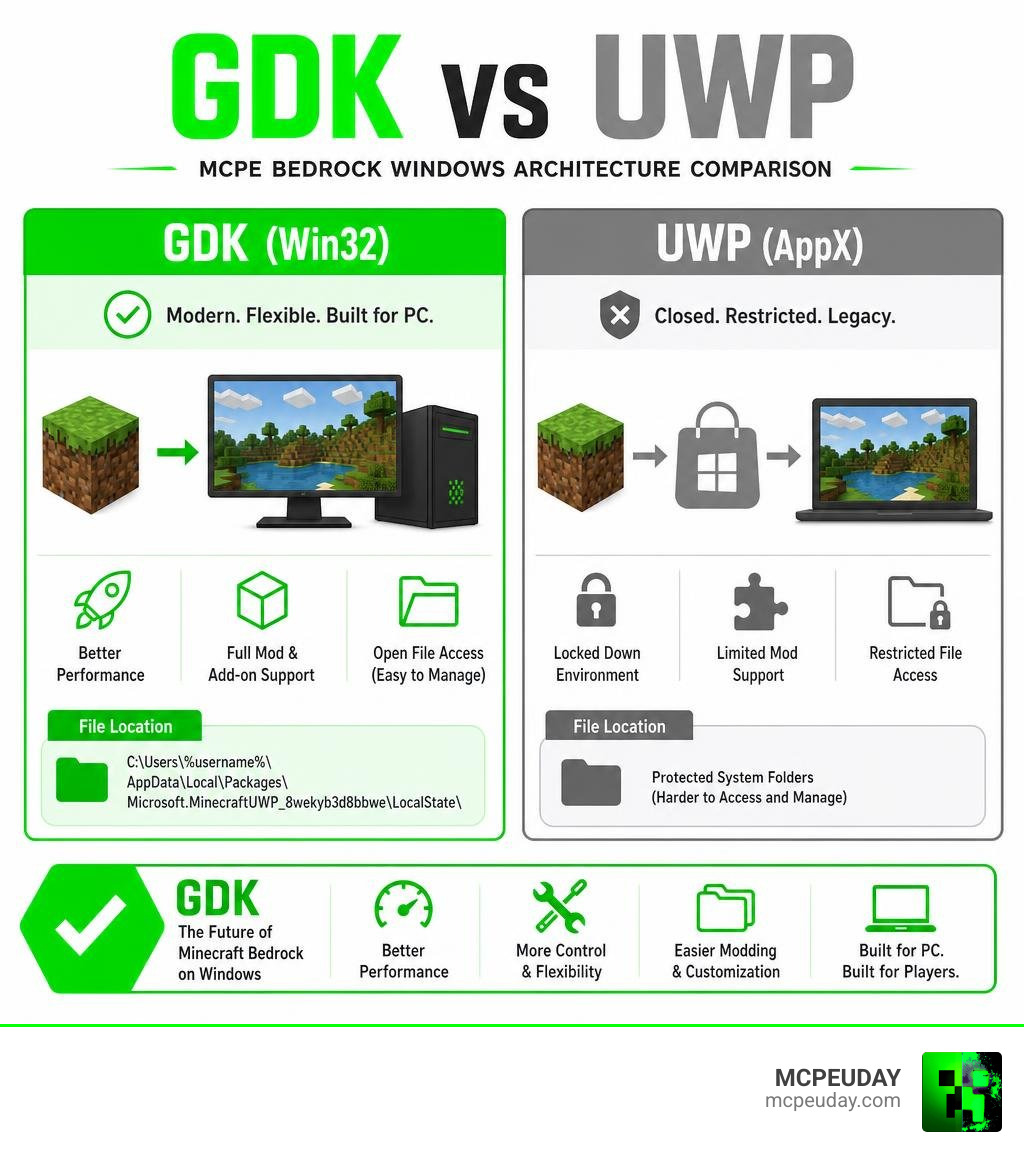
To understand why this version is such a big deal, we have to look under the hood. For years, Minecraft Bedrock on Windows ran as a Universal Windows Platform (UWP) app. While UWP was great for safety, it was incredibly restrictive for modding, custom shaders, and offline play.
By migrating to the Microsoft Game Development Kit (GDK) framework, Minecraft Bedrock now runs as a native Win32 application. This is the same runtime environment used by major PC gaming platforms like Steam and the Xbox App on Windows.
According to Microsoft’s developer updates, the GDK brings massive performance and packaging improvements. For instance, the new GDK features introduced in the The Latest Features in the April 2026 Microsoft Game Development Kit (GDK) Release and documented in What’s new in the Microsoft Game Development Kit (GDK) – Microsoft Game Development Kit | Microsoft Learn show a 64% to 94% reduction in content update sizes, alongside packaging speeds that are 2x to 8x faster.
For us everyday players, this means:
- Better performance: Smoother frame rates and faster chunk loading.
- True offline play: No more licensing checks constantly nagging you when your internet drops.
- Easier modding: Native Win32 access makes injecting custom scripts, textures, and shaders far less of a headache.
If you are looking to explore custom maps, mods, or older versions, check out our Category/Mcpe Bedrock hub, where we keep a massive, up-to-date collection of gameplay modifications.
Key Differences in MCPE Bedrock Windows GDK (1.26.X)
The transition from UWP to GDK (which started back in version 1.21.120) completely rewrote how Minecraft handles local files. If you are an active modder or someone who likes to back up world files manually, this is the most critical change you need to know.
Under the old UWP system, your worlds, resource packs, and behavior packs were stored deep inside the restricted AppData/Local/Packages folder. With the GDK migration, Minecraft now utilizes shared storage paths that are much easier to access.
For a complete breakdown of how this migration affects your local files, you can read the official GDK Migration on Windows (from Minecraft version 1.21.120) documentation.
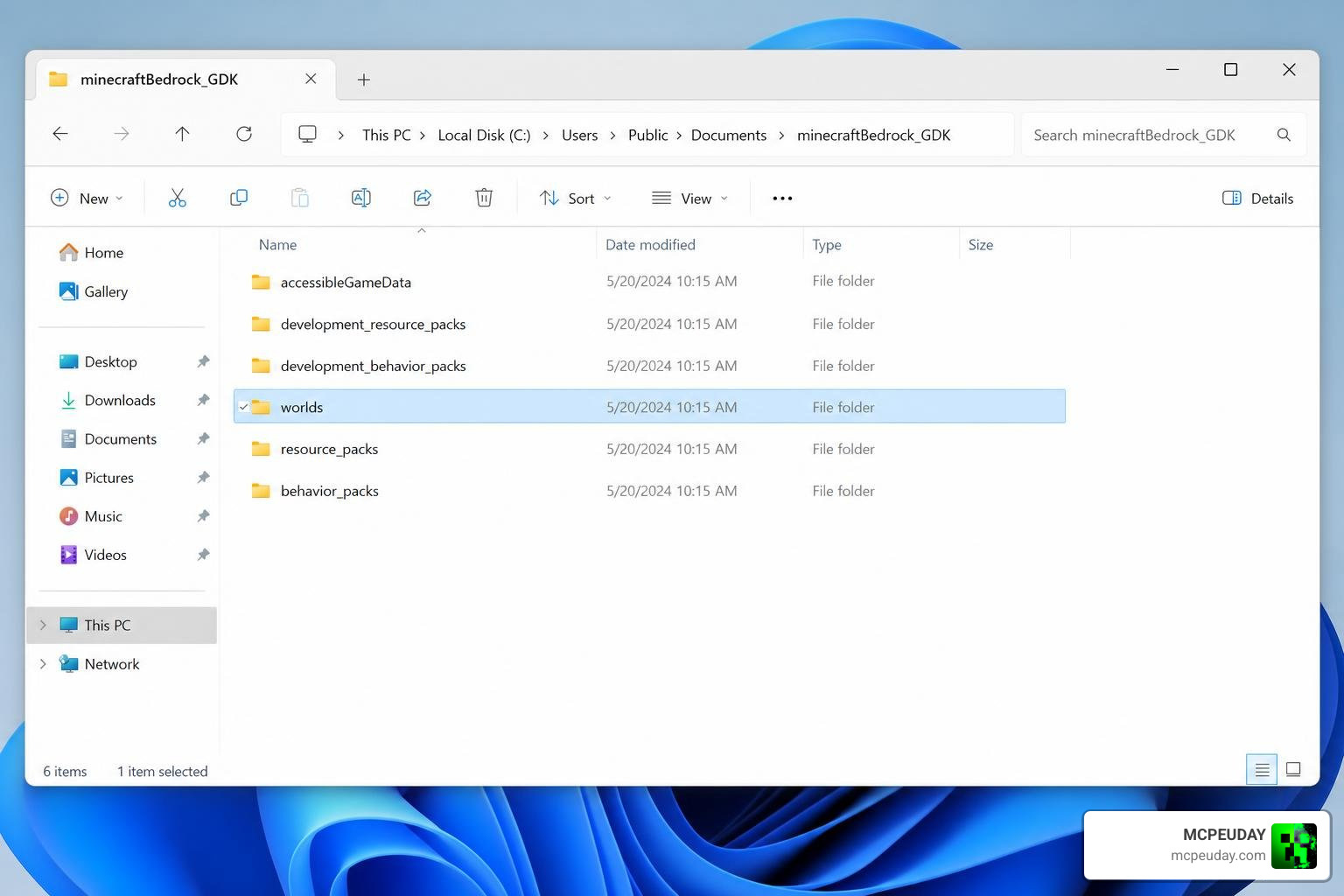
Because the files have moved, using third-party launchers or manually installing add-ons requires you to point your tools to the new GDK directory structure.
Why Developers Use MCPE Bedrock Windows GDK (1.26.X)
For creators, developers, and modders, MCPE Bedrock Windows GDK (1.26.X) is a dream come true. Because the public GDK shares roughly 80% of its interfaces with the console-grade GDKX, developers can build next-generation tools directly on Windows 10 and 11. You can explore the open-source libraries yourself on the official microsoft/GDK repository.
In the 1.26.X branch, creators gain access to:
- Command Macros: Execute complex command sequences instantly using customizable keyboard shortcuts (like Alt+key combinations).
- Cinematic Camera Splines: Use the new
/play_splinecommand to create gorgeous, smooth camera paths for trailers or adventure maps. - Static Colored Lighting & Shaders: The GDK framework handles custom graphics pipelines much better, allowing advanced rendering techniques to shine.
This enhanced rendering capability has paved the way for breathtaking visuals. For example, you can run the Newb X Ambient Shader For Minecraft Pe Realistic Lighting Smooth Shadows Fps Friendly to get realistic lighting and smooth shadows without melting your graphics card.
System Requirements and Installation Guide
Before we jump into the installation steps, let’s make sure your PC can handle the GDK version.
Unlike older mobile-centric builds, the GDK version is built strictly for modern 64-bit desktop environments. This means Windows 7, Windows 8, and 32-bit versions of Windows 10 are completely unsupported.
Requirements Comparison Table
| Feature | Standard Microsoft Store Bedrock | MCPE Bedrock Windows GDK (1.26.X) |
|---|---|---|
| OS Support | Windows 10 / 11 | Windows 10 (1903+) / Windows 11 |
| Architecture | 32-bit & 64-bit | 64-bit Only |
| Required Services | Microsoft Store, Xbox App | Microsoft Gaming Services, GameInput |
| Offline Play | Limited (Requires periodic online checks) | 100% Offline Capable after install |
| Version Switching | Difficult (Requires registry hacks) | Seamless (Via LeviLauncher or MCLauncher) |
To run the game smoothly, we highly recommend using a custom launcher. Two of the most popular community launchers are:
- LeviLauncher: A dedicated desktop launcher for Bedrock GDK. It has 276 stars and 45 releases on GitHub, and it is designed to manage, isolate, and mod multiple game builds.
- MCLauncher (mc-w10-version-launcher): A highly popular multi-version launcher with over 1,000 stars on GitHub, allowing you to run various Minecraft versions side-by-side.
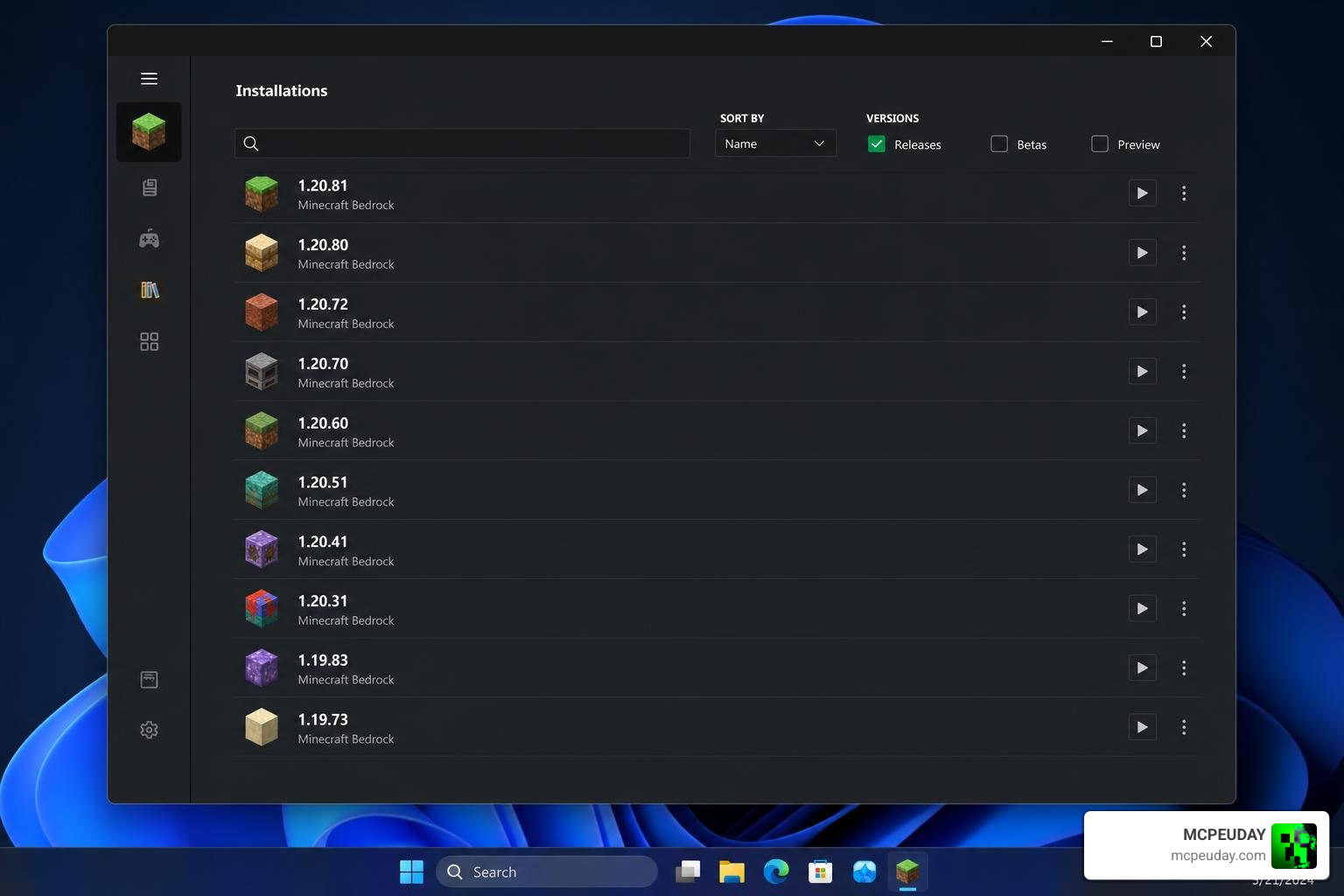
Step-by-Step Installation Guide
Follow these simple steps to install the offline GDK version:
- Verify Prerequisites: Ensure your Windows 10/11 system is fully updated, and that you have Microsoft Gaming Services and Microsoft GameInput installed. Turn on “Developer Mode” in your Windows Settings.
- Download the Installer: Obtain the offline installer package for MCPE Bedrock Windows GDK (1.26.X) (such as version 1.26.20.4).
- Bypass SmartScreen (If Prompted): Because this is an offline package, Windows Defender SmartScreen might pop up. Simply click More Info and select Run anyway.
- Run the Setup: Double-click the
.exeinstaller, choose your installation directory, and click Install. - Launch and Play: Once completed, open the game using the desktop shortcut or through your preferred launcher (like LeviLauncher). Log in with your Microsoft account to sync your purchases and cross-play data.
Supported Features, Add-ons, and Known Limitations
The 1.26.X branch is packed with incredible gameplay updates. Under the year-based versioning system, 1.26 brings two massive drops:
- Tiny Takeover: Fully redesigned baby mobs (cows, wolves, cats, and chickens) with unique models, hitboxes, and sounds. Plus, you can finally craft Name Tags using paper, ink, and string!
- Chaos Cubed: Introduces the underground Sulfur Caves biome, Sulfur blocks, Cinnabar minerals, and a brand-new vertical mining loop.
Because the GDK version behaves like a native Win32 app, it supports all your favorite custom content, including survival mode, creative mode, local multiplayer, and custom shaders.
To get the most out of your game’s graphics, we recommend downloading Mcpe Patched 1 26 X Download Free Mbl2 Support Shaders Skin 4D Night Vision, which provides excellent support for MBL2, custom 4D skins, and night vision.
Additionally, if you are playing on a mid-range or budget PC, check out the Newb X Lowres Shaders For Minecraft Pe Mcpe Complete Beginners Guide Installation Settings Fps Tips to keep your frame rates high while enjoying gorgeous, realistic lighting.
Known Limitations
- Only One Instance at a Time: While launchers like MCLauncher let you install multiple versions side-by-side, you can only run one active instance of Minecraft Bedrock at any given time.
- Beta/Preview Restrictions: If you use the launcher to test experimental Beta or Preview builds, keep in mind that these builds cannot connect to standard Realms or featured multiplayer servers.
Frequently Asked Questions about MCPE Bedrock GDK
Is MCPE Bedrock Windows GDK legal to use?
Yes, it is entirely legal. However, it is not a tool for piracy. To use GDK launchers or offline installers, you must own a legitimate license of Minecraft Bedrock Edition purchased through your Microsoft account. The launchers simply help you manage, isolate, and run the files you legally own.
Does the GDK version require an active internet connection?
No! One of the biggest advantages of the MCPE Bedrock Windows GDK (1.26.X) offline installer is that once the initial setup and licensing checks are complete, you can play your local survival and creative worlds completely offline. You only need an internet connection if you want to play on Realms, join multiplayer servers, or access the Marketplace.
How does GDK handle updates compared to the Microsoft Store?
The official Microsoft Store version forces automatic updates, which can instantly break your favorite behavior packs or lock you out of your favorite multiplayer servers if they haven’t updated yet.
By using GDK offline packages and launchers like LeviLauncher, you gain complete control over your updates. You can choose when to update, roll back to previous versions, or run multiple versions side-by-side without them overwriting each other.
Conclusion
The transition of Minecraft Bedrock to the GDK framework in the 1.26.X branch is a massive win for PC players. It delivers better optimization, true offline play, and opens the door for incredible modding and shader capabilities that were once locked away by the limitations of UWP.
Whether you are looking to explore the yellow-tinted depths of the new Sulfur Caves or want to beautify your world with high-performance shaders, we have got you covered. Head over to our Category/Mcpe Bedrock section to download the latest mods, skins, and graphics packs to make your 1.26.X journey unforgettable!
MCPE Bedrock Windows GDK Download
For MCPE 1.21.132
Download MCPE 1.21.x
For MCPE 1.26.0, 26.0
Download MCPE 1.26.x/26.x
For MCPE 1.26.21.1
Download MCPE 1.26.x/26.x
MORE ADDONS – MCPE/Bedrock – MCPEUDAY
