What Is the Paradise.exe Addon and How Does It Work?
If you found the Paradise.exe Addon while searching for Minecraft PE, Bedrock, or Java Edition addons, the first thing to know is that this file is not a normal Minecraft addon pack. MCPE/Bedrock addons are usually distributed as .mcaddon, .mcpack, .zip, or resource/behavior pack folders, not as standalone Windows .exe files. On MCPEUDAY, this guide is best read as a safety and compatibility explainer for gamers who may confuse similarly named “Paradise” downloads with Minecraft mod content.
In its racing-simulator context, the Paradise.exe Addon is associated with custom motion simulator setups for high-speed racing games like Burnout Paradise. When you drive a car inside the game, the game engine calculates physical parameters such as pitch, roll, heave, surge, sway, speed, and lateral G-forces. However, the legacy game engine does not broadcast this motion telemetry data to third-party hardware out of the box using built-in network telemetry protocols like modern simulators do.
This is where memory hooking comes in. The Paradise.exe Addon acts as an intermediary plugin designed to attach to the running game process in system memory. By reading specific dynamic memory addresses in real time, the plugin extracts vehicle behavior data directly from RAM and streams it over local network sockets or memory pipes to control software like SimTools. This is very different from installing a Minecraft shader, world, behavior pack, or horror addon.
Primary Functions of Paradise.exe Addon
The main goal of the plugin is to transform digital racing action into physical kinetic feedback for full motion platforms and tactile transducers. The primary features and telemetry functions include:
- Velocity & Acceleration Tracking: Translates forward acceleration, heavy braking forces, dynamic drag, and sudden stops into physical movement signals across the pitch and surge axes.
- Directional G-Force Extraction: Captures cornering dynamics such as yaw, roll, and lateral sway so a motion chair can tilt into sharp turns, drifts, and high-speed maneuvers.
- Surface & Crash Telemetry: Hooks into sudden collision spikes, vertical suspension forces, and road surface textures, triggering hardware shakers, tactile bass transducers, or active seat belt tensioners.
- SimTools Telemetry Output: Packages extracted raw memory data into standardized telemetry packets that SimTools GameManager converts into servo and motor commands for motion hardware rigs.
For Minecraft players, the key takeaway is simple: if a download advertised as a Minecraft addon requires you to run an unknown Paradise.exe, treat it with caution and verify the source before opening it.
Disambiguating the Paradise.exe Addon from Unrelated Software
Because “Paradise” is a widely used name across software development, gaming platforms, and artificial intelligence, users frequently confuse this specific motion telemetry plugin with unrelated digital projects.
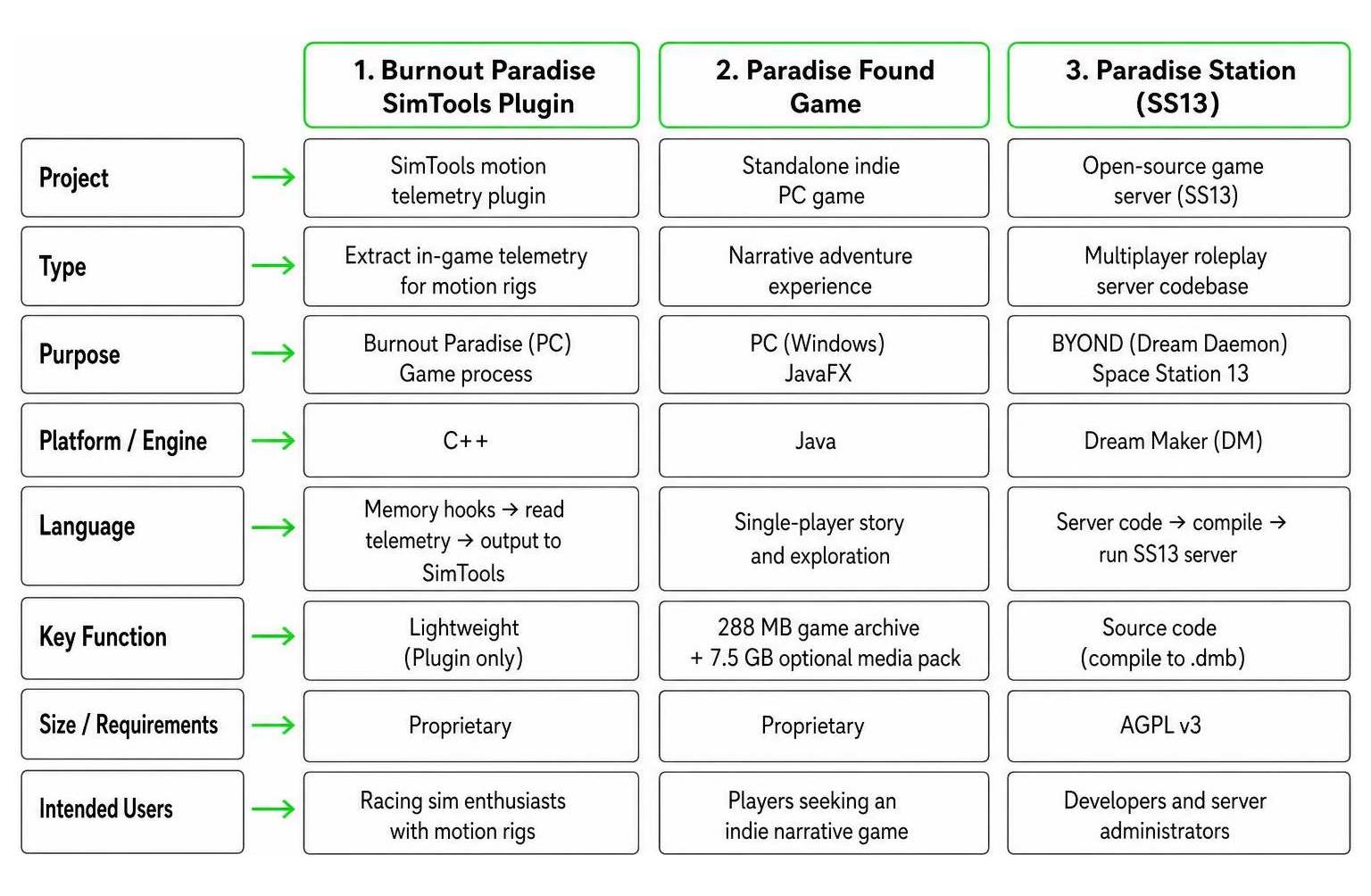
To avoid downloading the wrong software or exposing your system to security hazards, note the key technical differences between these distinct projects:
- Burnout Paradise SimTools Plugin: The focus of this guide – a lightweight motion telemetry hooking tool for racing simulators and motion rig hardware setups, not a Minecraft addon.
- Paradise Found Game: A standalone indie PC narrative game developed from scratch in Java and JavaFX by Alcahest. The core game archive is 288 MB ($12.00 USD) and relies on an optional 7.5 GB media pack. Learn more on the official page for Paradise Found by Alcahest.
- Paradise Station (SS13): An open-source Space Station 13 server repository written in Dream Maker (DM) under the AGPL v3 license. It requires compiling
paradise.dmeinto aparadise.dmbbinary using BYOND’s Dream Daemon environment. You can view the code via the Paradise SS13 Repository or review setup steps in .github/DOWNLOADING.md. - Paradise AI Coding Agent: A self-evolving terminal-based AI developer assistant utilizing an EDEN-ARBOR biological neural network architecture with spiking attention mechanics and Hebbian learning algorithms. Check out the official repository at README.md .
- Real Estate or Steam Games: Other completely separate entries include real estate projects like Riyasat Paradise Extension Block A, Vatika Road, Jaipur, software portals such as Paradise Free Download, and store pages like Paradise on Steam.
Step-by-Step Guide to Installing the Paradise.exe Addon
Setting up the Paradise.exe Addon requires careful attention to file safety, game build verification, administrative privileges, and application startup order. If you are visiting MCPEUDAY for Minecraft content, do not use these steps for MCPE/Bedrock addons. Minecraft addons should normally be imported through Minecraft itself or placed in the correct resource and behavior pack folders, while the Paradise.exe workflow below applies to a Windows racing telemetry plugin.

Before downloading and configuring files, consult this quick build compatibility table to confirm whether your game copy supports direct telemetry hooking:
| Game Edition / Release Type | Executable Version | Direct Plugin Detection? | Recommended Workaround |
|---|---|---|---|
| Original PC Disc (The Ultimate Box) | v1.0.0.0 (13/12/2008) | Partial / Mixed | Check patch status; test launching game first |
| Original PC Disc (Patched) | v1.1.0.0 | High Compatibility | Standard SimTools patching |
| Steam Version (Legacy Build) | Standard Steam .exe | Native Support | Automatic SimTools hooking |
| Cracked / Pirated Copies | Modified binaries | Unsupported / Unstable | Memory addresses differ; causes crashes |
| Burnout Paradise Remastered | 64-bit Remaster .exe | Broken / No Signal | Test renaming .exe to original executable name |
Step 1: Download the File and Verify Security Signatures
Whenever you acquire executable files or game telemetry tools from online repositories, safety comes first. This matters especially for Minecraft players because real MCPE/Bedrock addons rarely require unknown standalone Windows installers. Automated sandbox scans of files labeled Paradise(3).exe on Paradise(3)[.]exe | Triage™ reveal critical technical metadata and system behavior:
- File Parameters: 5.6 MB file size with SHA256 hash
48370428e89bcd15f766cb17f30927a3d88b78f325391698a40d91ae1b0316a4. - Triage Security Score: 3/10 (Low/Moderate risk flags).
- Security Signatures: Marked for “Unsigned PE” and “Checks for missing Authenticode signature”.
- Dynamic API Imports: Executes
WinHTTPnetworking calls alongsideUser32andKernel32DLL functions.
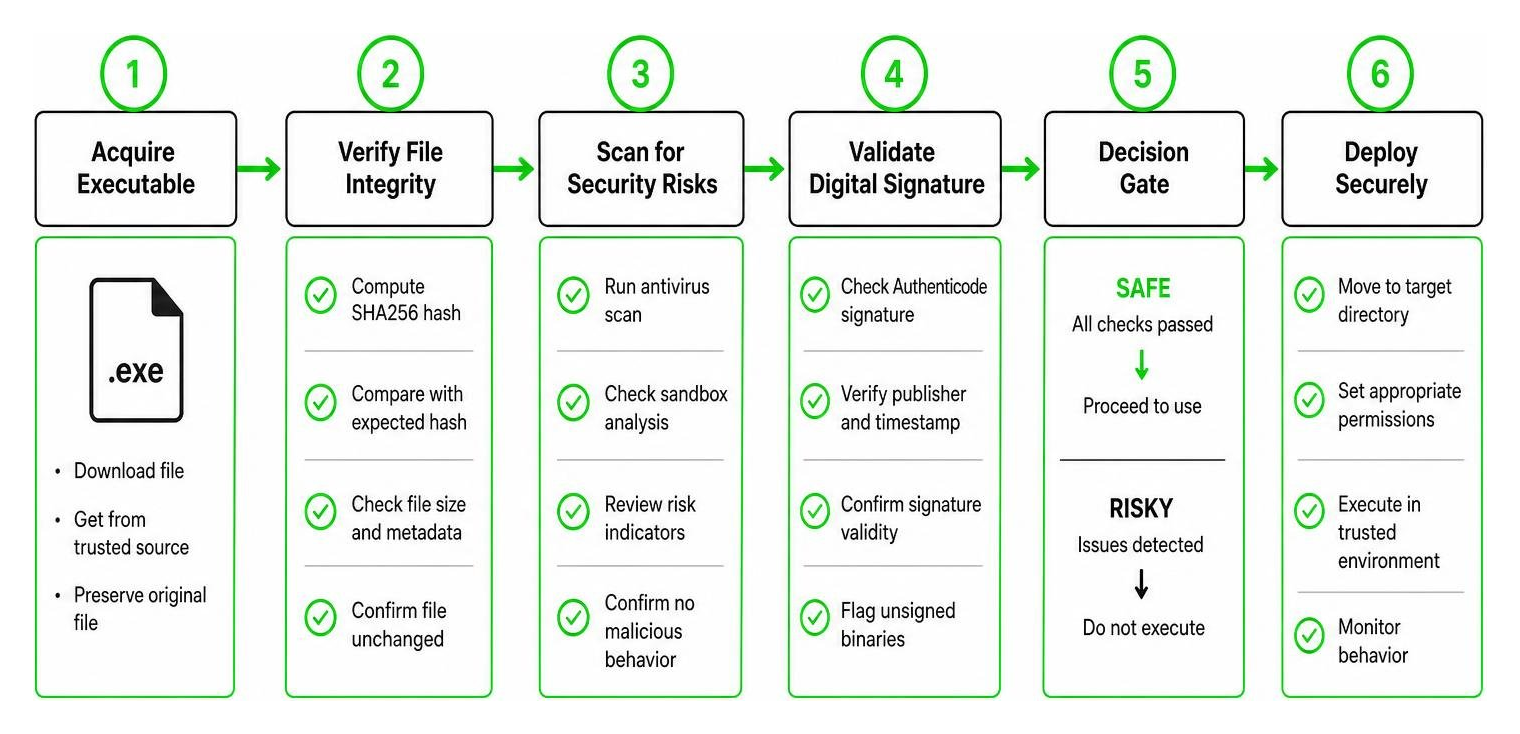
Always cross-reference cryptographic SHA256 hashes using PowerShell (Get-FileHash), run downloaded files through updated security software, and never run standalone executable installers for game mods that should natively be provided in standard ZIP archives, .mcaddon, .mcpack, or dedicated .ptp plugin files.
Step 2: Configure SimTools for Burnout Paradise Compatibility
- Extract the downloaded plugin package into your designated SimTools plugins directory on your local drive.
- Open the SimTools Plugin Manager with administrative rights.
- Click Install Plugin and select the
.zipor.ptpfile provided specifically for Burnout Paradise. - Verify that SimTools recognizes the target executable path. If you are running a retail physical disc release (v1.0.0.0 or v1.1.0.0), ensure the game is fully patched to v1.1.0.0 to match the plugin’s pre-mapped memory offsets.
- Workaround for Remastered Users: If you are attempting to output motion telemetry for Burnout Paradise Remastered, legacy plugins will fail because the 64-bit executable architecture shift alters all memory offsets. Some community members test renaming the remastered executable to match the legacy executable name (
BurnoutParadise.exe), though success varies depending on the offset shifts.
Step 3: Patch Game Executable and Launch Telemetry
- In SimTools GameManager, select Burnout Paradise from the target game drop-down menu.
- Click Game Patching and point the directory path to the folder containing your main game executable file.
- Apply the patch. SimTools will attempt to insert its memory hook DLLs or set up local UDP loopback parameters, typically defaulting to IP
127.0.0.1and standard motion communication ports. - Set up your motion axis bindings in SimTools Control Center to ensure motor output signals (Roll, Pitch, Heave, Yaw, Sway, Surge) are correctly assigned to your motion controller axes.
If your goal is simply to install Minecraft mods, stop here and use Minecraft-compatible addon formats instead of executable telemetry tools.
Troubleshooting Paradise.exe Addon Crashes and Telemetry Failures
Telemetry plugins often encounter operational issues due to administrative security blocks, dynamic memory location shifts, firewall interference, or incorrect application launch orders. For MCPEUDAY readers, these issues are also useful warning signs: a file that hooks another process, requests elevated permissions, or opens network communication is not behaving like a standard Minecraft shader, texture pack, map, or behavior pack.
Resolving Executable Mismatches and Plugin Crashes
If your motion rig is not responding or SimTools crashes the moment you start the engine, run through these troubleshooting steps to restore steady telemetry streaming:
- Adjust Startup Order: Instead of launching SimTools first and using it to boot the game, start Burnout Paradise manually from desktop or Steam. Once you are in the main game menu or driving in Paradise City, alt-tab out and launch SimTools GameManager. This allows the game process to fully initialize memory structures before the plugin attempts to attach its hook.
- Run as Administrator: Security policies in modern OS builds can prevent unprivileged background processes from reading memory addresses of other running software. Right-click both SimTools and the game executable, navigate to Properties > Compatibility, and check “Run this program as an administrator”.
- Verify Non-Steam Executable Names: Non-Steam copies, custom patches, or third-party digital repacks alter binary signatures and memory offsets. Ensure your executable build matches the exact patch version required by the plugin.
- Check SimTools Versioning & Port Conflicts: Most legacy racing plugins were written specifically for SimTools v2. While SimTools v3 offers legacy compatibility modes, updated plugins or modified memory wrappers are frequently required for full v3 stability. Additionally, verify that local firewall rules do not block UDP port traffic between GameManager and your motion controller interface.
If you downloaded Paradise.exe while trying to install a Minecraft addon, do not troubleshoot it as a Minecraft file. Delete or quarantine suspicious downloads, scan your system, and return to trusted Minecraft addon formats.
Frequently Asked Questions
Is Paradise.exe Addon a Minecraft addon?
No. Based on the telemetry-plugin context described in this guide, the Paradise.exe Addon is associated with Burnout Paradise, SimTools, and motion simulator hardware. It is not a standard MCPE/Bedrock or Java Edition addon. Minecraft players should be especially cautious with any download that claims to be a Minecraft addon but arrives as an unknown .exe file.
Why is my Paradise.exe Addon not detecting the game?
The most common cause is an executable build mismatch or permission boundary. Legacy telemetry plugins rely on fixed memory offsets within system RAM. If you use a non-Steam copy, an unpatched physical disc version (v1.0.0.0 instead of v1.1.0.0), or Burnout Paradise Remastered, the plugin cannot locate the required vehicle telemetry addresses. Running both SimTools and the game with elevated Administrator privileges also resolves detection failures caused by Windows access controls.
Is the plugin compatible with SimTools v2 and SimTools v3?
The Paradise.exe Addon was designed natively for SimTools v2. It functions reliably on v2 setups with original game builds. For SimTools v3, legacy plugins can run into migration, socket binding, or memory hook errors. Updated plugin releases, legacy wrapper modes, or manual memory address remaps are often required to achieve seamless v3 operation.
How can I verify if Paradise.exe contains security risks?
Examine the file’s digital signature and cryptographic hash before execution. Genuine software drivers and verified utility builds generally carry valid Authenticode signatures. If sandbox analysis engines like Triage report an “Unsigned PE” flag, low-level WinHTTP network calls, or generic suspicious behavior, quarantine the file, verify its SHA256 checksum against trusted community releases, and avoid executing unverified installers on your primary gaming rig.
What should MCPEUDAY users download instead for Minecraft?
For Minecraft, look for addon formats and instructions that match your edition. MCPE/Bedrock content commonly uses .mcaddon, .mcpack, world files, resource packs, and behavior packs. Java Edition commonly uses mod loaders and .jar mod files from trusted sources. A racing telemetry .exe should not be treated as a Minecraft mod installer.
Conclusion
The Paradise.exe Addon can be useful for a specific group of racing simulator users who want Burnout Paradise telemetry on physical motion platforms, but it is not a normal Minecraft addon. If you came to MCPEUDAY looking for MCPE/Bedrock or Java Edition mods, shaders, horror addons, maps, or gameplay packs, use Minecraft-compatible file formats and avoid running unknown executables that are unrelated to Minecraft.
For users who intentionally need the racing telemetry plugin, safer setup depends on matching supported game builds such as v1.1.0.0, configuring correct administrative access rights, managing firewall port exceptions, and launching applications in the proper sequence. Always double-check file signatures and download source integrity before running any .exe file on your gaming PC.
For more Minecraft-focused guides, gaming news, hardware setup tips, and technical walkthroughs, Explore Mod Addons on MCPEUDAY to keep your gaming hardware and software running smoothly!