Sleeping Coffins Addon replaces traditional beds with immersive coffins in Minecraft, allowing players to sleep like vampires while enhancing horror, medieval, and RPG gameplay styles.
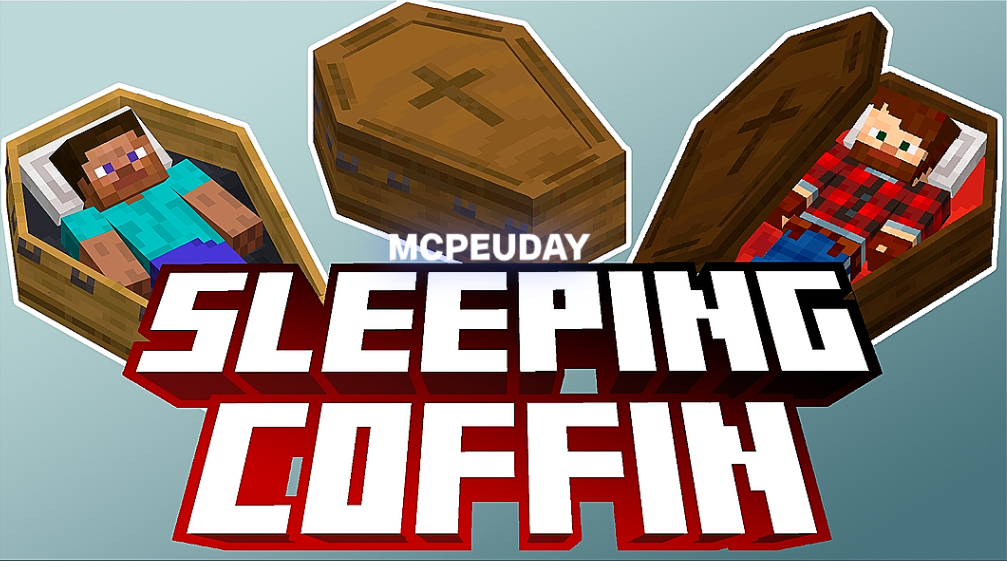
Minecraft is all about creativity, and players constantly look for unique ways to customize their gameplay experience. The Sleeping Coffins Addon is a perfect example of this creativity. Instead of sleeping in regular beds, this addon allows players to sleep inside coffins, adding a dark, mysterious, and immersive touch to the game.
Whether you are building a vampire-themed world, a medieval map, or a horror survival experience, the Sleeping Coffins Addon fits perfectly. It works smoothly in Minecraft Bedrock Edition and offers a fresh alternative to standard sleeping mechanics without breaking the game’s balance.
This article covers everything you need to know about the Sleeping Coffins Addon, including features, compatibility, installation steps, gameplay uses, and frequently asked questions.
What Is the Sleeping Coffins Addon?
The Sleeping Coffins Addon is a Minecraft Bedrock addon that introduces functional coffins into the game. These coffins work similarly to beds, allowing players to skip the night and set their spawn point, but with a completely different visual and thematic style.
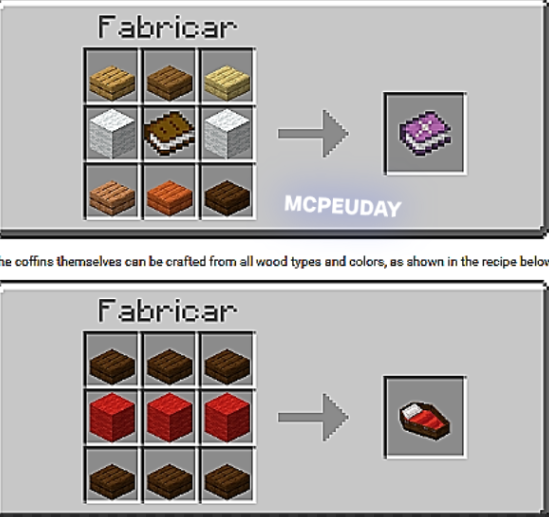
Instead of placing a bed, players can craft or obtain a coffin and sleep inside it. The addon is designed for players who enjoy dark fantasy, gothic builds, or roleplay-based gameplay.
Key Features of Sleeping Coffins Addon
Here are the main features that make this addon popular among Minecraft players:
1. Functional Sleeping Coffins
- Coffins work like beds
- Allows players to sleep and skip nighttime
- Sets player spawn point
2. Immersive Design
- High-quality coffin textures
- Dark and medieval aesthetics
- Perfect for horror and RPG worlds
3. Bedrock Edition Friendly
- Optimized for Minecraft Bedrock
- Works smoothly on mobile, console, and Windows
- Lightweight and performance-friendly
4. Survival & Creative Mode Support
- Can be used in survival gameplay
- Available for creative building and map design
5. Roleplay Enhancement
- Ideal for vampire, undead, or gothic roleplay servers
- Adds storytelling depth to custom worlds
Features:
Why Use Sleeping Coffins Instead of Beds?
Beds in Minecraft are practical but limited in style. The Minecraft Coffin Addon offers an alternative that enhances immersion without removing functionality.
Reasons players prefer sleeping coffins:
- Better thematic consistency in horror or medieval builds
- Unique visual appeal
- Improved roleplay experience
- Fresh gameplay without complex mechanics
This addon is especially popular among content creators and map builders who want their worlds to feel more atmospheric and realistic.
Compatibility & Requirements
Before installing, make sure your game meets these requirements:
- Minecraft Version: Bedrock Edition (latest recommended)
- Platforms: Android, iOS, Windows 10/11, Xbox, PlayStation
- Experimental Features: May be required depending on addon version
- Game Mode: Survival & Creative supported
The addon is designed to work with most texture packs and shaders, making it easy to integrate into existing worlds.
How to Install Sleeping Coffins Addon (Step-by-Step)
Installing the Sleeping Coffins Addon is simple and beginner-friendly.
Step 1: Download the Addon
Download the addon file from a trusted Minecraft addon website.
Step 2: Import into Minecraft
- Open the downloaded
.mcaddonor.mcpackfile - Minecraft will automatically import the addon
Step 3: Activate the Addon
- Go to World Settings
- Enable Behavior Pack
- Enable Resource Pack
Step 4: Enable Experimental Features
If required:
- Enable Holiday Creator Features
- Enable Beta APIs
Step 5: Enter the World
Create or load a world and start using sleeping coffins.
How to Use Sleeping Coffins in Gameplay
Using a coffin is similar to using a bed:
- Place the coffin on a solid block
- Right-click or tap to sleep
- Night will pass automatically
- Spawn point will be saved
Coffins can be placed inside castles, crypts, underground bases, or vampire mansions for maximum immersion.
Best Use Cases for Sleeping Coffins Addon
This addon shines in many gameplay styles:
- Vampire Survival Worlds
- Horror Adventure Maps
- Medieval Kingdom Builds
- RPG Roleplay Servers
- Dark Fantasy Story Maps
Map creators often use this addon to replace beds entirely and create a consistent visual theme.
Performance & Stability
The Coffin Mod for Minecraft is optimized to run smoothly even on low-end devices. It does not add heavy entities or scripts, making it safe for long-term survival worlds.
- No noticeable FPS drops
- Stable in multiplayer environments
- Compatible with most addons
Conclusion
The Sleeping Coffins Addon is a simple yet powerful addition to Minecraft Bedrock Edition. By replacing ordinary beds with immersive coffins, it transforms the way players experience nighttime gameplay.
Whether you are a builder, roleplayer, or survival player looking for something new, this addon delivers style, functionality, and creativity without compromising performance. It’s an excellent choice for anyone who wants to make their Minecraft world darker, richer, and more atmospheric.
—
– Sleeping Coffins Addon DOWNLOAD –
—
—
Frequently Asked Questions (FAQ)
Q1: Is Sleeping Coffins Addon available for Java Edition?
No, this addon is designed specifically for Minecraft Bedrock Edition.
Q2: Does the coffin work exactly like a bed?
Yes, it allows players to sleep, skip the night, and set their spawn point.
Q3: Can I use this addon in survival mode?
Yes, it works perfectly in both Survival and Creative modes.
Q4: Does it support multiplayer servers?
Yes, it is compatible with multiplayer and roleplay servers.
Q5: Will this addon affect game performance?
No, the addon is lightweight and optimized for smooth gameplay.
Q6: Can I use it with texture packs or shaders?
Yes, it works well with most texture packs and shaders.