
Prizma Visuals Pack upgrades Minecraft’s visuals with vibrant colors, improved lighting, smooth shadows, and immersive effects, giving your world a modern, cinematic, and eye-catching look.
Prizma Visuals Pack For Al3xis5
Minecraft is known for its simple block-style graphics, but many players want a more visually impressive experience without losing the game’s original charm. Prizma Visuals Pack is a high-quality Minecraft visual texture pack designed to enhance lighting, colors, and overall atmosphere while keeping performance smooth. This pack is perfect for players who want better graphics without using heavy shaders.
What Is Prizma Visuals Pack?
Prizma Visuals Pack is a lightweight visual enhancement pack that improves how Minecraft looks by adjusting color balance, lighting tones, and environmental effects. Instead of changing core textures, it focuses on visual clarity and atmosphere, making your Minecraft world feel fresh, vibrant, and immersive.
Key Features of Prizma Visuals Pack
- Enhanced lighting for a brighter and more realistic world
- Improved color saturation without overdoing it
- Smooth shadows and balanced contrast
- Cleaner sky visuals and better environmental tones
- Performance-friendly and works on most devices
- Keeps Minecraft’s original texture style intact
Screenshots:
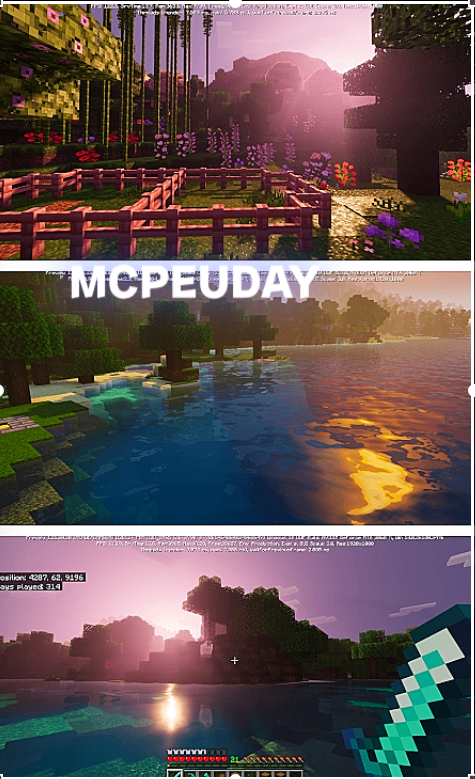
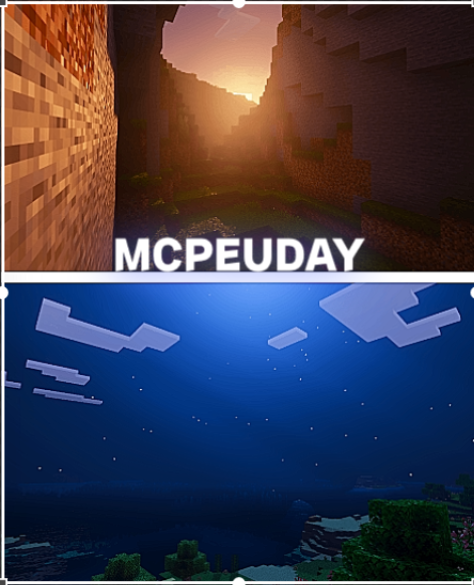
Why Choose Prizma Visuals Pack?
Many visual packs either drastically change Minecraft’s style or heavily impact performance. Prizma Visuals Pack offers the perfect balance. It enhances visuals while remaining lightweight, making it suitable for both low-end and high-end systems. Whether you play survival, creative, or multiplayer, this pack improves immersion without distractions.
Compatibility and Requirements
- Works with most modern Minecraft versions
- Compatible with both survival and creative modes
- Does not require powerful hardware
- Can be used alongside other texture packs
This makes Prizma Visuals Pack an excellent choice for players who want visual improvements without complex setup.
How to Install Prizma Visuals Pack
- Download the Prizma Visuals Pack file from a trusted source
- Open Minecraft and go to Settings
- Navigate to Resource Packs
- Import the downloaded pack
- Activate the pack and restart the game if needed
Once enabled, your Minecraft world will instantly look more vibrant and polished.
Best Use Cases
- Players who want better visuals without shaders
- Low-end device users seeking performance-friendly upgrades
- Content creators who want cleaner visuals for screenshots and videos
- Survival players who want a more immersive atmosphere
– Prizma Visuals Pack DOWNLOAD –
Conclusion
Prizma Visuals Pack is an excellent choice for Minecraft players who want improved graphics without sacrificing performance. With enhanced lighting, vibrant colors, and a clean visual style, it delivers a beautiful and immersive experience while staying true to Minecraft’s original design. If you want a simple yet powerful visual upgrade, this pack is definitely worth trying.
—
[…] Download Shader […]
[…] Prizma Visuals Pack for MCPE […]
[…] Prizma Visuals Pack for MCPE […]
[…] given extra data—like heightmaps, roughness, and metallic values. When light hits a block in the Prizma Visuals Pack, it doesn’t just illuminate a flat surface; it bounces off ridges, creates micro-shadows, and […]
[…] By utilizing Physically Based Rendering (PBR) materials, this pack completely changes how light bounces off blocks. Instead of flat, 2D textures, iron blocks look metallic and reflect light sources, rough stone catches shadows in its deep crevices, and glass behaves like real glass, refracting light dynamically. PBR works by using multiple texture maps for a single block: an albedo map for color, a normal map for surface depth, a roughness map to determine light scattering, and a metalness map to define metallic reflections. If you want to dive deeper into how these packs are built and optimized, you can check out our detailed reviews of the Prizma Visuals Pack and the Prizma Visuals Pack For Mcpe. […]
[…] love customizing your game’s interface and overall look, you might also want to check out the Prizma Visuals Pack For Mcpe for an even greater visual […]
[…] & Atmosphere: For a magical, stylized atmosphere, the Prizma Visuals Pack For MCPE and the Wandrers Visual Pack offer gorgeous color palettes that make extended horizons look like a […]
[…] world look even more breathtaking, we highly recommend pairing this pack with cozy shaders like the Prizma Visuals Pack For Mcpe or the Wandrers Visual Pack. For those who want their lighting to pop, combining it with the […]