What is a Pasta Shader and How Does It Function?
When real-time graphics developers talk about rendering organic materials, food is often considered one of the hardest categories to get right. Cooked pasta, sauce, and dough require a balance of surface roughness, fine structural ridges, and light scattering. The term Pasta Shader refers to shader logic designed to capture these organic, semi-translucent material properties, as well as modular software architectures that assemble GLSL shaders dynamically like building blocks.
Whether you are building interactive WebGL apps or creating 3D assets for games, shader pipelines use mathematical models to compute how light interacts with every pixel or fragment on a mesh surface.
Understanding the Pasta Shader Concept
Procedural shading creates visual surface detail using math rather than static image files. For organic materials like food, light does not just bounce straight off the surface; it penetrates beneath the outer layer, scatters inside, and exits at a slightly different position.
Without simulating this light absorption and scattering, cooked noodles look like hard yellow plastic. A true Pasta Shader combines surface grain, low-frequency color variations, specularity, and subsurface translucency to achieve an authentic “al dente” appearance in real-time viewports.
Modularity in WebGL with GLSL Pasta
Writing GLSL (OpenGL Shading Language) shaders by hand often leads to duplicate code. The glsl-pasta library provides a modular string-splicing framework for Elm WebGL development. The library name is a playful reference to copy-pasting code blocks together to generate GLSL programs automatically.
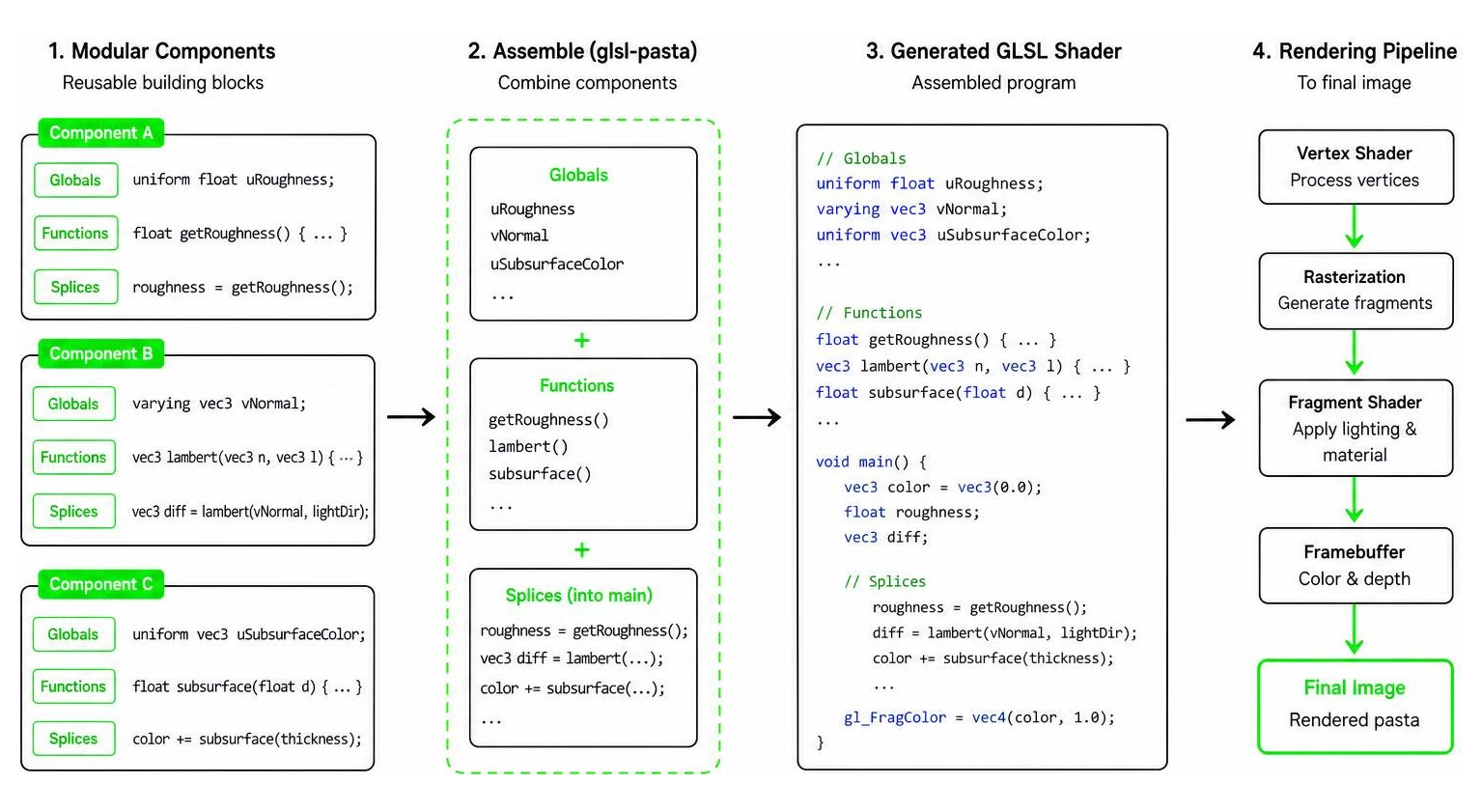
Instead of writing a massive monolithic fragment shader, developers define components containing three distinct elements:
- Globals: Uniform declarations, varyings, and global variables.
- Functions: Helper functions for calculating lighting models like Lambert or Phong.
- Splices: Standardized code lines injected directly inside the
main()function.
The package automatically resolves dependencies, deduplicates global inputs, concatenates GLSL functions, and inserts them into template string placeholders (__PASTA_GLOBALS__, __PASTA_FUNCTIONS__, and __PASTA_SPLICES__). Standard Phong shading requires ambient, diffuse, specular, and attenuation components calculated along Tangent, Bitangent, Normal (TBN) matrices. If a component requirement (such as pixelNormal or diffuseColor) is missing during combination, GLSLPasta.combine logs an explicit error to the JavaScript console and returns an empty string to prevent runtime GLSL compilation crashes.
Building Realistic Procedural Pasta Materials Across Platforms
Creating believable food assets requires specific node logic depending on your production software. Different 3D tools excel at different stages of the material pipeline.
Mastering Pasta Shader Surface Details in Blender
In Blender, a realistic procedural pasta material relies heavily on the Principled BSDF node coupled with fine surface bump mapping:
- Subsurface Scattering (SSS): Enable SSS on the Principled BSDF node. Crucially, default SSS RGB radius settings in rendering engines are tuned for human skin. For pasta, recalibrate the SSS radius values toward yellow and orange tones to match cooked starch translucency.
- Procedural Ridges: Connect a Wave Texture to a Bump node, then feed it into the Normal input of the shader to construct uniform pasta ridges (such as penne or rigatoni lines).
- Surface Granularity: Mix a Noise Texture into the Roughness channel to simulate microscopic flour texture and subtle surface imperfections.
- Mesh Geometry: When modeling macaroni or fusilli using concentric circles, a Screw modifier, and a Subdivision Surface, always recalculate mesh normals after applying modifiers to avoid shading artifacts.
Physics Simulation and Map Baking with Houdini and Substance
For complex pile materials (such as a bowl of fusilli), standard procedural tiling nodes like Substance Designer’s Tile Sampler or Shape Splatter often cause ugly mesh intersections and overlaps.
To overcome this, artists combine Houdini dynamic physics simulations with Substance Designer texture generation, as documented in Making Fusilli Pasta Material with Substance 3D Designer & Houdini.
- Dynamic Distribution: Individual 3D fusilli models are dropped into a container using Houdini’s AutoDopNetwork dynamic simulation setup with Bullet physics, settling naturally without intersection.
- Tileable Map Baking: The settled pile is converted into tileable Normal, Height, Ambient Occlusion, and ID maps using Houdini’s
Mesh_TilerandMaps_Bakernodes (setting Max Trace Distance to 10). Baking normal maps directly in Houdini rather than converting baked height maps later prevents harsh edge artifacts. - Sauce and Ingredient Layering: In Substance 3D Designer, procedural sauce layers are blended over the pasta height map. Color palettes are sampled directly from food photography, balancing glossy tomato sauce roughness with translucent pasta height masks.
Stylized Canvas Rendering and the Unity Pastel Shader
Not all shaders aim for photorealism. Many games opt for stylized artistic aesthetics using canvas textures and hand-painted painterly effects.
Technical Features and UV Seam Pitfalls
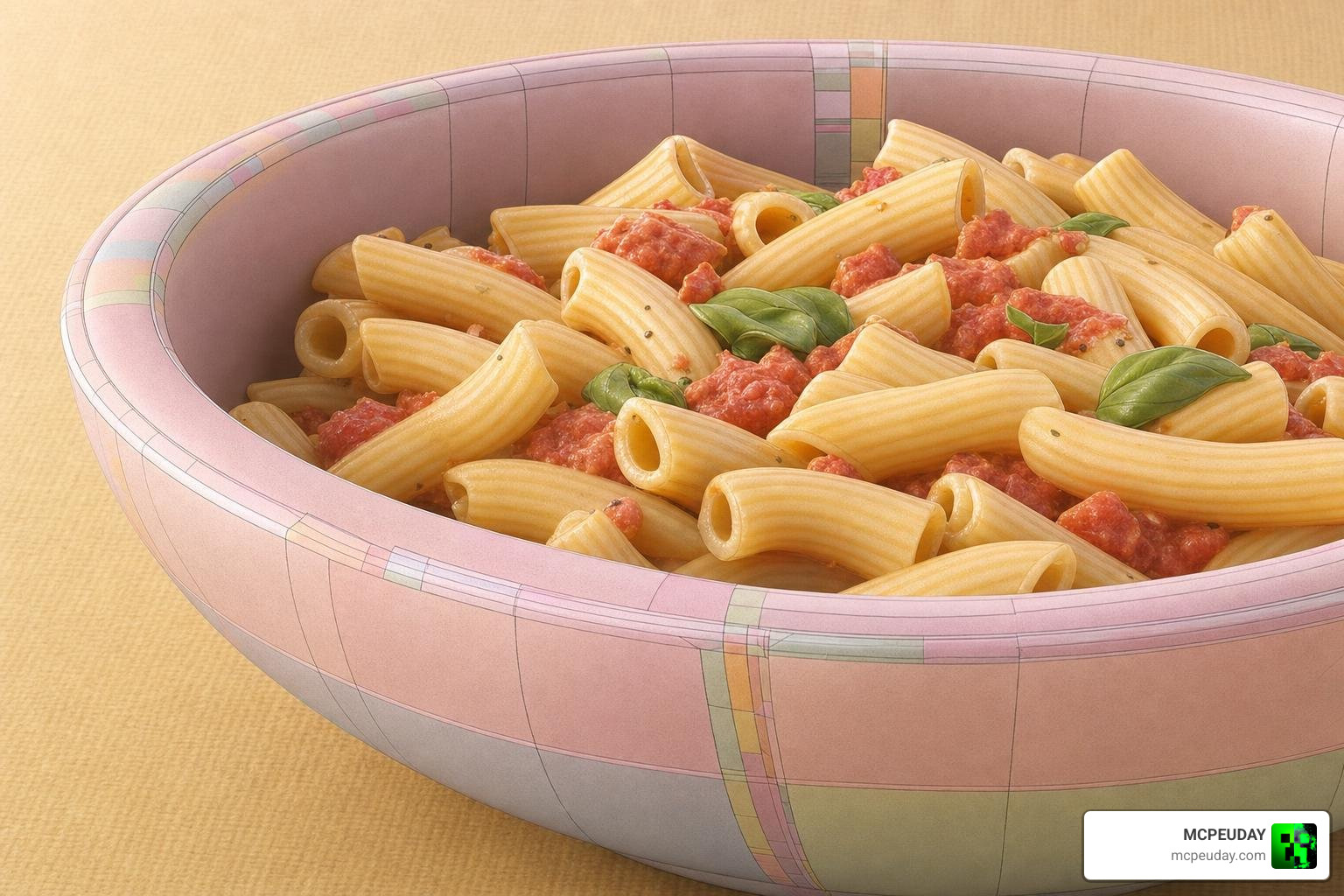
A popular real-time non-photorealistic rendering asset is the Pastel Shader on Unity Asset Store (priced at $19 for a single entity license). It transforms standard textures into a soft, hand-painted pastel aesthetic in real time.
Key technical characteristics and requirements include:
- Pipeline Exclusivity: The shader is built exclusively for Unity’s Universal Render Pipeline (URP), specifically tested on Unity 6 (6000.1.12f1). It is incompatible with the Built-in Render Pipeline or High Definition Render Pipeline (HDRP).
- Dependencies: Requires two free asset packages to function correctly: Shared Demo Assets URP and Anime Cel Shader URP.
- Asset Package Contents: Ships with 22 unique canvas-style base textures (2048×2048 resolution), custom color control properties (
_Saturation,_Brightness,_Contrast), and a bonus 3D vase model with 13 texture variations. - UV Seam Dependency: Noise-based distortion (
_DistortionScale,_DistortionAngle,_NoiseRotation) shifts pixel sampling along U and V coordinates to mimic physical brushstrokes. Because of this, the shader is sensitive to poor 3D UV layouts. Poorly unwrapped meshes will exhibit visible seams and texture tearing at hard UV borders. Developers should use the includedDemo_SeamDebugscene to inspect seams before applying distortion.
Modular Customization Using Shader Hooks
Stylized material frameworks frequently rely on shader hooks to inject custom logic into graphics pipelines. According to the p5.Shader Reference Documentation, developers working in p5.js can inspect available vertex and fragment hooks using inspectHooks().
By invoking modify() on a baseMaterialShader, you can inject modular GLSL logic into hooks like getWorldInputs or getPixelInputs. This allows developers to modify vertex positions over time using sine waves or customize pixel outputs dynamically without re-writing the underlying lighting engine.
Rendering Pipeline Comparisons and Optimization Best Practices
Choosing the right render pipeline dictates both visual capability and real-time performance. Game engines like Unity provide lightweight URP for cross-platform speed and heavy HDRP for realistic lighting, while offline renderers like Blender’s Cycles handle deep subsurface physics at the cost of frame time.
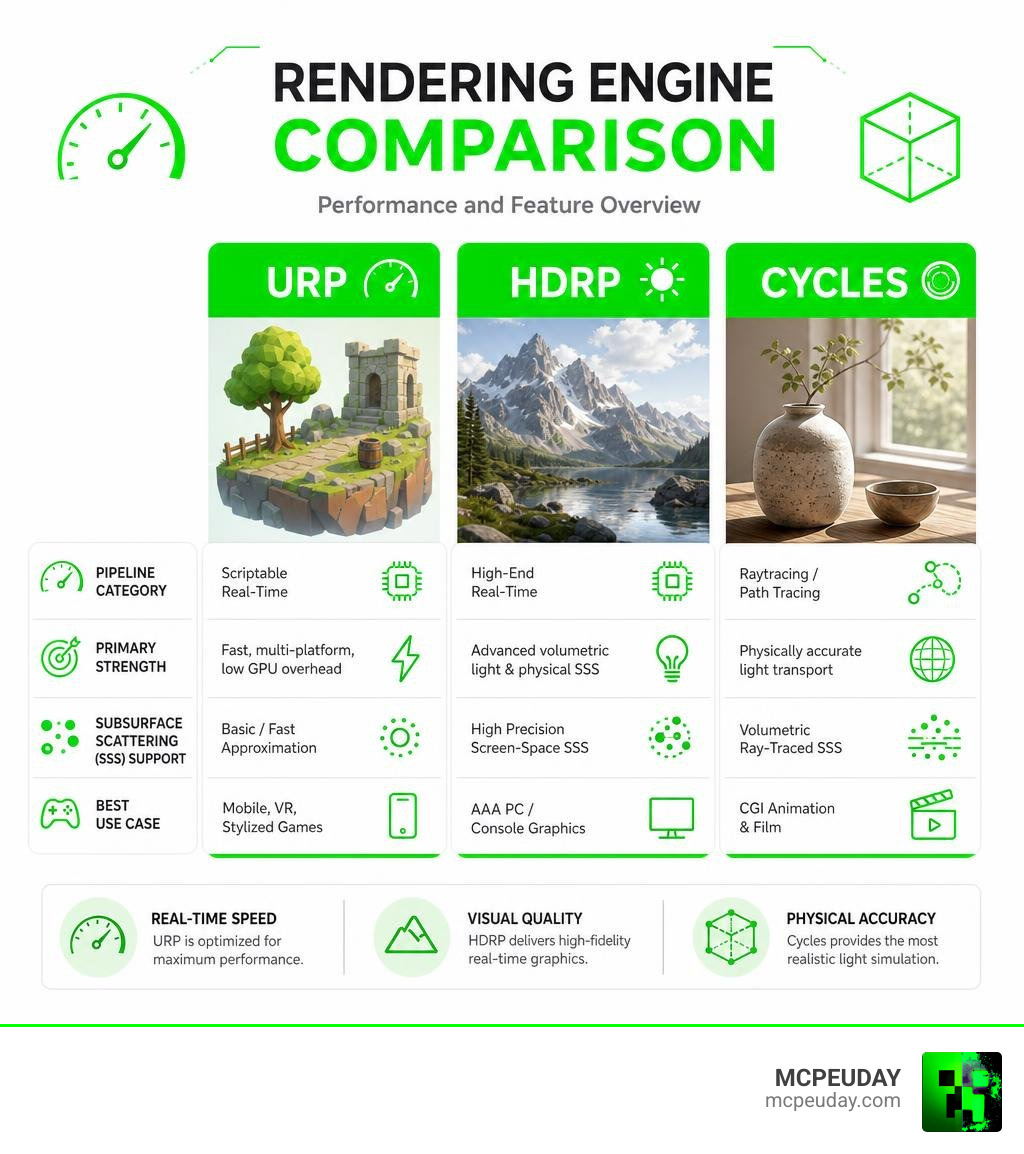
| Rendering Pipeline / Engine | Pipeline Category | Primary Strength | Subsurface Scattering (SSS) Support | Best Use Case |
|---|---|---|---|---|
| Unity URP (Universal) | Scriptable Real-Time | Fast, multi-platform, low GPU overhead | Basic / Fast Approximation | Mobile, VR, Stylized Games |
| Unity HDRP | High-End Real-Time | Advanced volumetric light & physical SSS | High Precision Screen-Space SSS | AAA PC / Console Graphics |
| Blender Cycles | Raytracing / Path Tracing | Physically accurate light transport | Volumetric Ray-Traced SSS | CGI Animation & Film |
| Blender Eevee | Real-Time Rasterizer | Rapid viewport rendering & iteration | Screen-Space Approximated SSS | Real-Time Pre-visualization |
| WebGL (GLSL Pasta) | Browser Shader Engine | Lightweight modular component execution | Custom Fragment Shading | Interactive Web Content |
For WebGL and mobile games, fragment performance is heavily influenced by texture samples and complex math execution. Minimizing heavy noise functions inside fragment shaders and baking procedural detail into compressed texture channels ensures smooth framerates on lower-end devices.
Frequently Asked Questions About Procedural Shaders
What causes UV seam artifacts when applying distortion effects?
UV seam artifacts occur when texture coordinates (U and V) jump across discontinuous edges on a 3D model’s UV map. When a shader applies noise-based distortion (_DistortionScale), the pixel offset calculation samples across these split seams, causing mismatching texture tears. Resolving this requires clean UV unwrapping, seam blending, or edge-intensity detection masks.
Why is Subsurface Scattering critical for realistic food materials?
Organic items like cooked pasta, sauce, cheese, and vegetables allow light to penetrate and scatter beneath their surface. Without Subsurface Scattering (SSS), materials reflect all light from their top layer, making organic food appear like solid painted plastic.
How do engine pipelines affect procedural shader performance?
Real-time pipelines like Unity URP process fragment shaders quickly by simplifying lighting calculations, making them ideal for mobile and interactive graphics. Path-tracing pipelines like Cycles recalculate thousands of light rays per pixel, enabling ultra-realistic SSS and depth at the cost of long render times.
Conclusion
Whether you are crafting realistic food materials in Blender and Houdini, styling hand-painted visuals in Unity URP, or organizing WebGL code with glsl-pasta, understanding how shaders handle surface math, lighting, and textures is essential for modern graphics work.
For gamers and creators interested in enhancing game graphics, mobile performance, and visual add-ons, Explore MCPE Shaders and Graphics Mods to discover our latest collections and guides.