If your Minecraft world feels repetitive — same plains, same forests, same boring terrain — then Biomes O’ Discovery Addon is exactly what you need.

This addon completely upgrades your world generation by making biomes denser, greener, and more realistic, without breaking the original survival experience. In simple words: Minecraft stays Minecraft… but looks 10x better.
Table of Contents
What is Biomes O’ Discovery Addon?
Biomes O’ Discovery Addon (1.21 / 1.26) is a lightweight MCPE/Bedrock addon that enhances the natural generation of:
- Trees 🌳
- Plants 🌿
- Terrain textures 🏞️
- Biome density
Instead of adding completely new unrealistic content, it focuses on making existing biomes richer and more immersive.
👉 The result? A world that feels alive from the moment you spawn.
Why This Addon is So Popular
Most biome mods try to change everything. This one does something smarter:
✅ 1. Keeps Vanilla Feel (Achievement Friendly)
Unlike many addons, this one keeps the core gameplay untouched — meaning you can still enjoy survival normally.
✅ 2. Beautiful & Natural World Generation
- Thicker forests
- Better riverbanks
- More detailed grass and vegetation
Everything looks more realistic without feeling “modded.”
✅ 3. Better for Builders
If you love building:
- Natural backgrounds look stunning
- Less need to decorate surroundings manually
- Perfect for aesthetic builds
✅ 4. Exploration Feels Fresh Again
You’ll actually want to explore again — hills, forests, and swamps feel unique and alive.
Screenshots:-
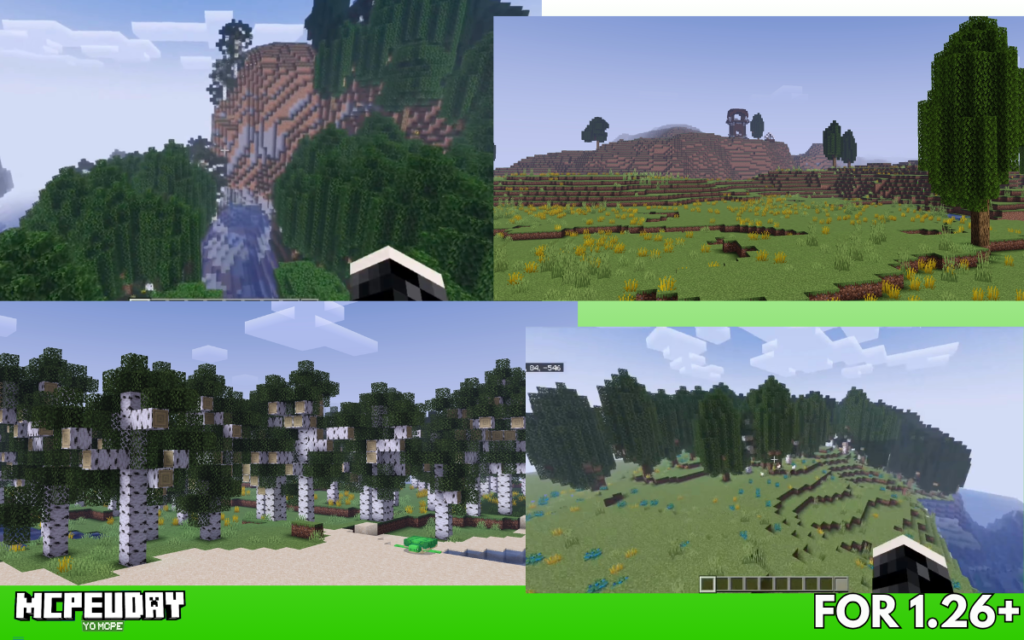
Key Features (Latest Version)
Here’s what you get in the latest versions:
- 🌳 New tree variations (including maple trees)
- 🌿 New bushes and vegetation types
- 🏔️ Improved mountain and taiga biomes
- 🌍 Enhanced terrain generation system
- 🎮 Compatible with Minecraft 1.21+ and even newer builds
👉 The addon focuses on visual + environmental improvement, not unnecessary complexity.
How to Install Biomes O’ Discovery Addon (Step-by-Step)
Follow this simple process:
Step 1: Download the Addon
- Download
.mcaddonfile from trusted sources
Step 2: Open File
- Tap the file → it will automatically import into Minecraft
Step 3: Activate in World Settings
- Go to Behavior Packs
- Enable the addon
Step 4: Turn ON Experimental Features
- This is required for proper functioning
Step 5: Create World & Enjoy 🚀
Pros and Cons
✅ Pros
- Lightweight & smooth performance
- Works with survival worlds
- Improves visuals massively
- Builder-friendly
❌ Cons
- Doesn’t add new mobs or structures
- Requires experimental settings
- May conflict with other biome addons
Biomes O’ Discovery vs Other Biome Addons
| Feature | Biomes O’ Discovery | Other Biome Mods |
|---|---|---|
| Vanilla Feel | ✅ High | ❌ Often lost |
| Performance | ✅ Lightweight | ⚠️ Can lag |
| New Biomes | ❌ No | ✅ Yes |
| Visual Upgrade | ✅ Excellent | ✅ Good |
👉 If you want realistic enhancement, choose this.
👉 If you want completely new worlds, go for heavy biome mods.
Who Should Use This Addon?
This addon is perfect for:
- 🧱 Builders (better landscapes automatically)
- 🎮 Survival players (no gameplay break)
- 📱 Low-end device users (optimized performance)
- 🌍 Explorers (fresh feeling worlds)
Pro Tips
- Use with shaders → visuals become insane
- Don’t combine with too many biome mods (can cause bugs)
- Best used in a new world for full effect
- Keep addon updated for latest Minecraft versions
FAQs
Q1. Is Biomes O’ Discovery safe to use?
Yes, if downloaded from trusted sites, it’s completely safe.
Q2. Does it work on Minecraft 1.21+?
Yes, it supports 1.21 and newer versions.
Q3. Will it affect FPS?
No, it’s lightweight and optimized.
Q4. Can I use it in survival mode?
Yes — it’s achievement-friendly.
Final Verdict
If you’re tired of boring Minecraft terrain but don’t want to ruin the vanilla experience, Biomes O’ Discovery Addon is one of the best choices available right now.
It doesn’t try to overload your game — it simply perfects what Minecraft already has.
Author
Written by: ZorroCraft 2.O, ZorroCraft2O
Minecraft content writer & addon tester with 4+ years of experience. Personally tested this addon on MCPE 1.21 for performance, compatibility, and gameplay experience.