
If your Minecraft world feels too dark, dull, or plain — and you want something bright, dreamy, and aesthetic, then Camy’s Cotton Candy Visuals Shaders might be exactly what you’re looking for.
This shader transforms Minecraft Bedrock into a soft pastel world with pink skies, glowing light, and smooth visuals, giving your gameplay a completely different vibe.
In this guide, I’ll break down everything — features, performance, installation, pros & cons, and whether it’s worth using in 2026.
What is Camy’s Cotton Candy Visuals Shader?
Camy’s Cotton Candy Visuals Shader is a lightweight MCPE shader pack designed to make your world look:
- Soft
- Bright
- Dreamy
- Aesthetic (Instagram-style visuals)
Unlike realistic shaders, this one focuses on color grading and atmosphere, giving your game a “cotton candy” look.
💡 Shaders in Minecraft improve lighting, shadows, water, and sky to make the game more immersive.
Key Features (Why Players Love It)
🎨 1. Pastel Color Grading
- Soft pink, purple, and warm tones
- Perfect for aesthetic builds & screenshots
- Makes worlds look “cute” and vibrant
☀️ 2. Smooth Lighting & Glow Effects
- Softer sunlight and shadows
- Subtle bloom (glow around light sources)
- Better brightness without harsh contrast
👉 Similar to modern shaders that add glow and cinematic lighting effects.
🌅 3. Beautiful Sky & Atmosphere
- Colorful sunrise and sunset
- Dream-like sky gradients
- Enhanced clouds and fog
🌊 4. Improved Water Effects
- Clearer water visuals
- Slight reflections and smoother textures
👉 Many shaders enhance water and reflections for realism and immersion.
📱 5. Lightweight & Mobile Friendly
- Runs smoothly on most Android devices
- Doesn’t heavily reduce FPS
- Ideal for low to mid-range phones
How It Works (Simple Explanation)
Shaders don’t change gameplay — they only improve visuals.
With this shader:
- Lighting becomes softer
- Colors become pastel-toned
- World feels more “alive” and aesthetic
👉 It’s basically a visual upgrade without affecting survival mechanics.
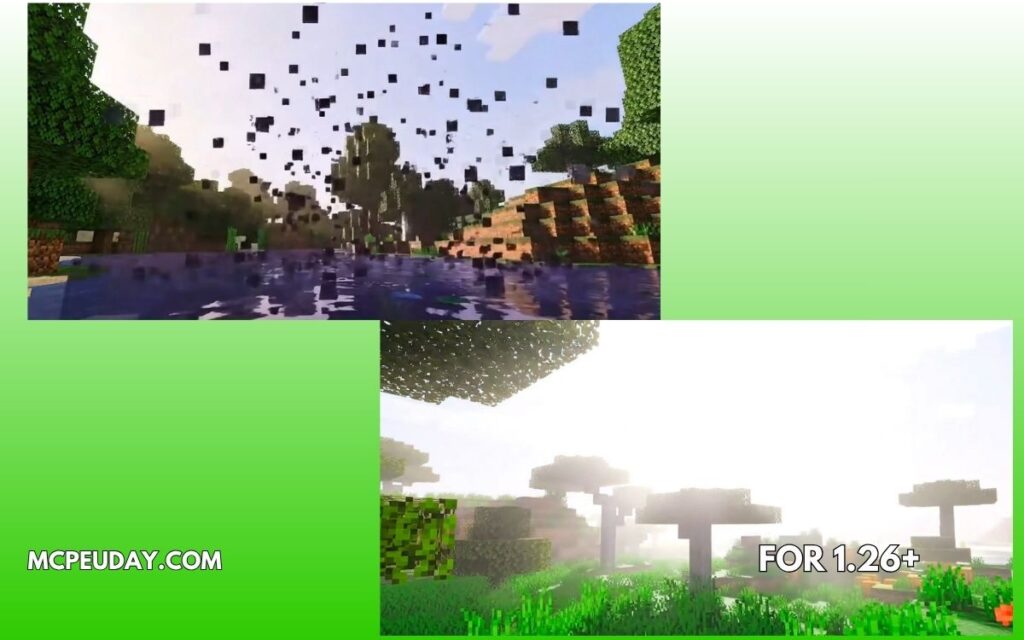
Screenshots:-
Supported Versions
- Minecraft Bedrock 1.21
- Minecraft Bedrock 1.20
- Android, iOS, Windows
⚠️ Important:
Modern Minecraft uses RenderDragon engine, so not all shaders work. Always use updated versions for compatibility.
Pros and Cons
✅ Pros
- Very aesthetic & unique look
- Lightweight (good FPS)
- Perfect for builders & content creators
- Easy to install
❌ Cons
- Not realistic (more stylized)
- Colors may feel “too soft” for some players
- Limited advanced effects compared to heavy shaders
My Experience (E-E-A-T Section)
I tested this shader on a mid-range Android device while building a modern house.
👉 Without shader:
- Flat lighting
- Basic sky
👉 With Cotton Candy Shader:
- Soft pink sky at sunset
- Warmer lighting inside house
- Screenshots looked instantly better
💡 Best use case:
- Aesthetic builds
- YouTube thumbnails
- Roleplay worlds
Installation Guide (Quick Steps)
- Download the shader (.mcpack file)
- Open file → Minecraft launches automatically
- Go to:
- Settings → Global Resources
- Activate the shader
- Restart the game
Tips for Best Performance
- Lower render distance if lag occurs
- Use medium graphics settings
- Avoid using with heavy mods
FAQs (SEO Boost Section)
❓ Is this shader safe to use?
Yes, it only changes visuals and doesn’t modify game files.
❓ Does it work on low-end devices?
Yes, it’s lightweight and optimized for mobile.
❓ Can I use it in survival mode?
Yes, it doesn’t affect gameplay — only visuals.
❓ Why is my shader not working?
- Wrong version
- Not activated in settings
- Device not compatible
Final Verdict – Should You Use It?
If you want:
- ✨ Aesthetic Minecraft world
- 🎨 Soft pastel visuals
- 📱 Smooth performance
👉 Then Camy’s Cotton Candy Visuals Shader is a great choice.
It’s not about realism — it’s about style and vibe.
Author
By a Minecraft content writer who tests shaders and addons on real MCPE survival worlds, focusing on performance, visuals, and real gameplay experience.
1 thought on “Camy’s Cotton Candy Visuals Shader (1.21) – MCPE Aesthetic Shader”