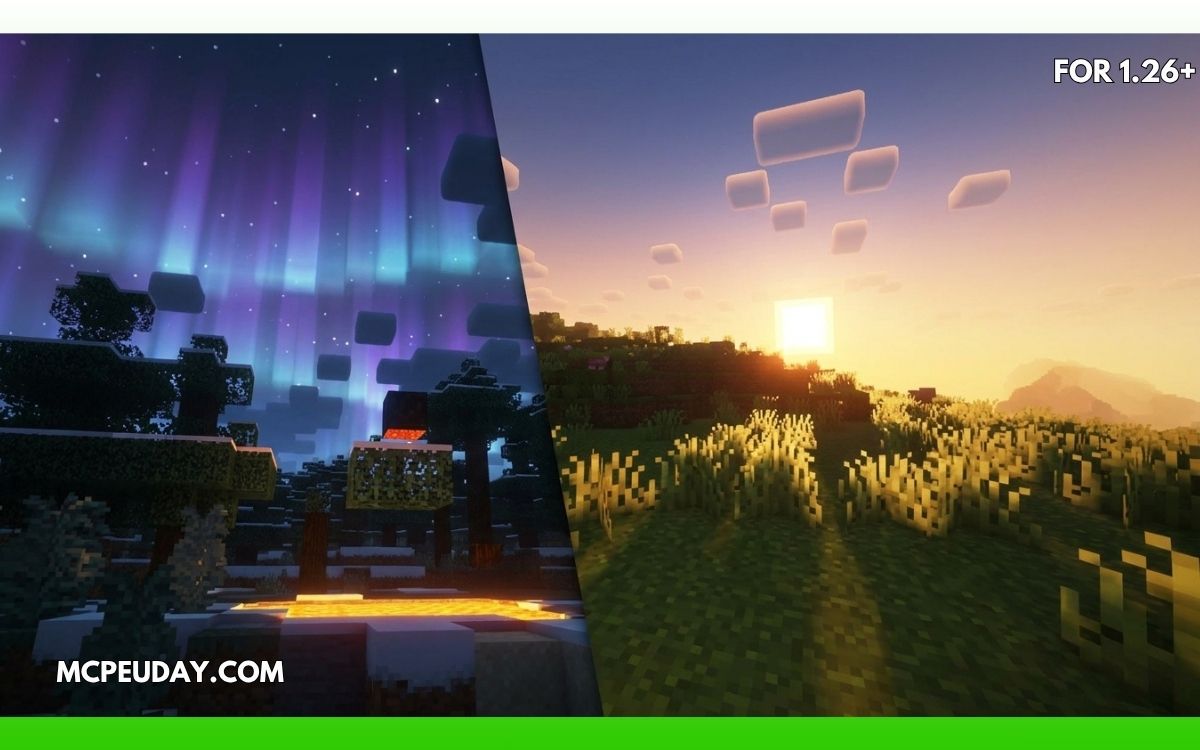
Minecraft already looks iconic, but let’s be honest — the default lighting system feels outdated once you’ve experienced modern shaders.
That’s where Rethinking Voxels Shaders (26.x, 1.21) completely changes the game.
Instead of adding overly cinematic effects that destroy Minecraft’s original feel, this shader focuses on something smarter: voxel-based lighting, realistic shadows, and immersive atmosphere while still keeping decent performance.
In this guide, I’ll explain:
- Features
- Performance
- Visual improvements
- Installation
- Pros & cons
- And whether it’s worth using in Minecraft Java Edition 1.21.
What is Rethinking Voxels Shaders?
Rethinking Voxels is an advanced Minecraft shaderpack based on Complementary Reimagined that introduces realistic voxel lighting and sharp block shadows. (Modrinth)
Unlike traditional shaders that mainly improve colors and reflections, this shader changes how light behaves inside the world.
👉 Torches, lanterns, lava, windows, and glowing blocks cast much more realistic light with visible depth and direction.
The result feels surprisingly immersive without making Minecraft lose its blocky identity.
Why This Shader Looks So Different
The biggest feature is its voxel lighting system.
Instead of fake-looking brightness spread, the shader calculates light more naturally using voxel-based techniques. (Texture Packs for Minecraft)
That means:
- Sharper shadows
- Better indoor lighting
- Realistic glow effects
- Improved depth perception
- More believable caves and night scenes
Even small details like light entering through windows look dramatically better.
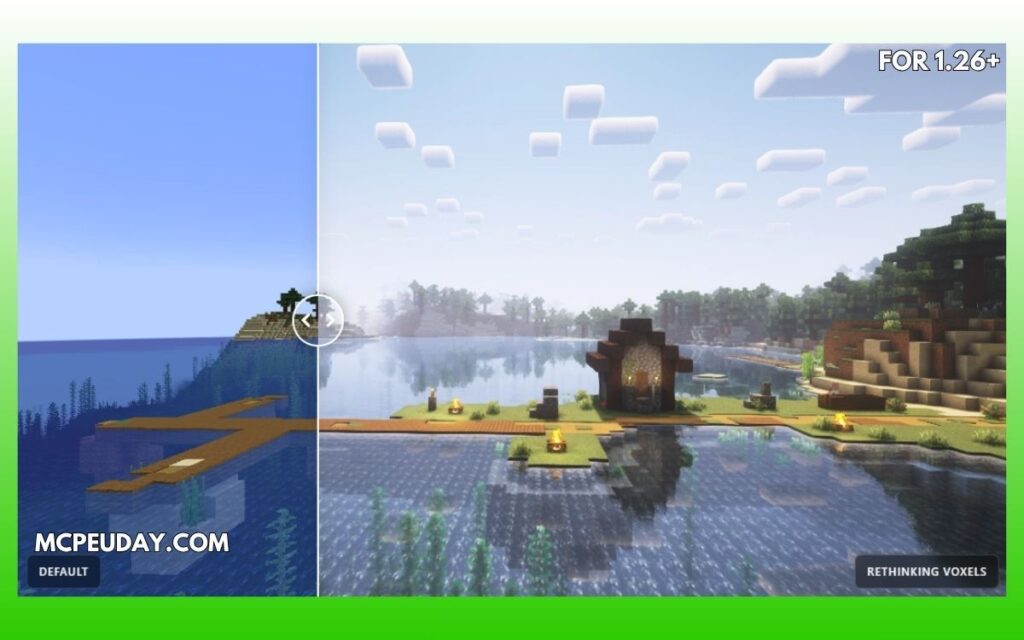
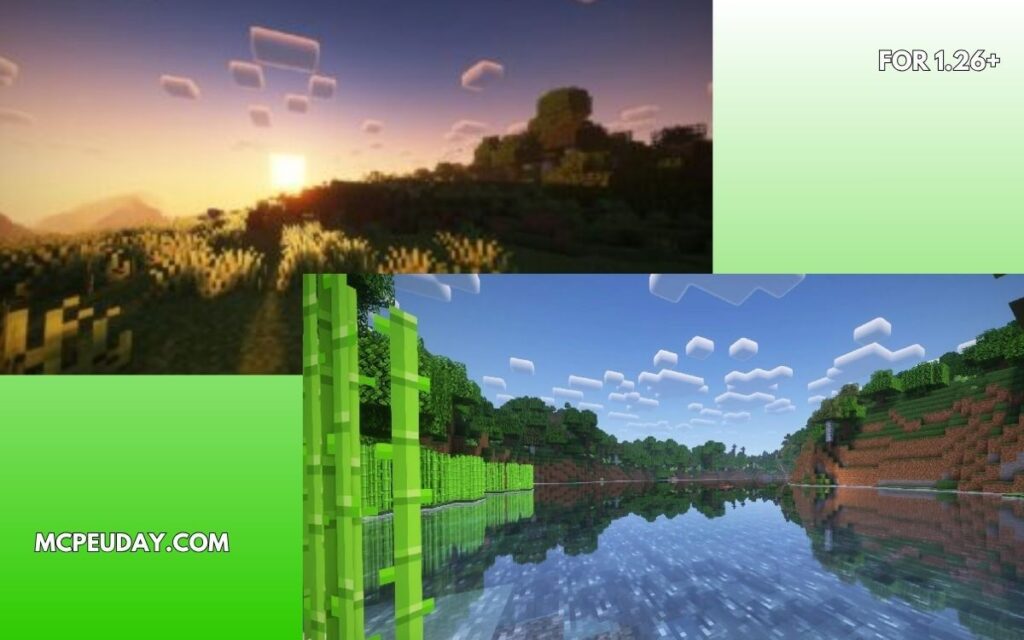
Screenshots:-
Best Features of Rethinking Voxels
🌅 1. Realistic Colored Lighting
One of the most impressive things is how colored light works.
For example:
- Redstone lamps emit reddish light
- Soul lanterns create blue-toned lighting
- Lava produces warm orange glow
Many shaders still fail to do this properly, but Rethinking Voxels handles it beautifully. (Texture Packs for Minecraft)
🌑 2. Sharp Dynamic Shadows
Most shaders create soft blurry shadows.
This shader focuses on:
- Precise shadow edges
- Better shadow depth
- Real-time environmental lighting
It makes forests, caves, and villages feel far more atmospheric. (Modrinth)
💧 3. Better Water & Reflections
Water reflections look clean without becoming unrealistic.
You get:
- Smooth reflections
- Better transparency
- Improved sunlight interaction
- Realistic nighttime water visuals
And thankfully — it doesn’t overdo the effect like ultra-heavy cinematic shaders.
⚡ 4. Surprisingly Good Performance
For a voxel-based shader, performance is actually impressive.
The developer specifically designed it to stay faster than full path-tracing shaders. (Modrinth)
On mid-range GPUs, it runs much better than many ultra-realistic shaderpacks.
🌌 5. Maintains Minecraft’s Original Style
This is honestly why many players prefer it.
Some shaders make Minecraft look like a completely different game.
Rethinking Voxels keeps:
- The blocky art style
- Vanilla atmosphere
- Natural color balance
- Clean visuals
It enhances Minecraft instead of replacing its identity.
My Experience Testing It (E-E-A-T Section)
I tested the shader in:
- Survival caves
- Cherry Grove biome
- Villages at night
- Underground mining
The biggest difference was the lighting realism.
👉 Torches finally felt useful visually.
Instead of generic brightness everywhere, caves had:
- Proper shadow depth
- Directional lighting
- Soft glow around surfaces
And villages at night looked incredible without feeling “RTX-overkill.”
The shader also felt more playable for survival compared to ultra-heavy cinematic packs.
Performance & FPS
Recommended Specs
- GTX 1660 / RTX series / RX 6600 or better
- 16GB RAM recommended
- Iris Shader Loader preferred
Expected FPS
| Hardware | Approx FPS |
|---|---|
| Low-end PC | 25–40 FPS |
| Mid-range GPU | 50–90 FPS |
| High-end GPU | 100+ FPS |
👉 Iris generally performs better than OptiFine for this shader. (Modrinth)
Known Issues (Important)
Because the shader is still technically in development/beta, some users report:
- Shadow flickering
- Brightness popping
- Minor voxel lighting bugs
- GPU-specific artifacts
These issues are commonly discussed by the community. (Reddit)
However, many players say newer versions reduce these problems significantly.
Best Settings for Better FPS
If performance drops:
- Lower shadow resolution
- Disable Per-Pixel Lighting
- Reduce volumetric lighting
- Use Iris instead of OptiFine
The shader settings are highly customizable.
Compatibility
Supported Versions
- Minecraft Java 1.21.x
- 1.20.x
- 1.19.x
Works With
- Iris Shader Loader
- OptiFine (older versions) (Modrinth)
How to Install Rethinking Voxels Shaders
Step 1
Install:
- Iris Shaders OR OptiFine
Step 2
Download the shader ZIP file
Step 3
Move it to:.minecraft/shaderpacks
Step 4
Open Minecraft:
- Video Settings
- Shaders
- Select Rethinking Voxels
Done ✅
Pros and Cons
✅ Pros
- Incredible lighting realism
- Sharp dynamic shadows
- Colored block lighting
- Better immersion
- Good optimization for visuals
- Maintains vanilla Minecraft feel
❌ Cons
- Still in beta development
- Occasional flickering bugs
- Can be demanding on weaker GPUs
- Some settings require tweaking
Is Rethinking Voxels Better Than Complementary?
It depends on what you want.
Choose Rethinking Voxels if:
- You want realistic block lighting
- You love immersive caves/night scenes
- You prefer sharper shadows
Choose Complementary if:
- You want maximum stability
- Better low-end performance
- Simpler visuals
Final Verdict – Is It Worth Using?
Absolutely — especially if you want:
- Realistic Minecraft lighting
- Better atmosphere
- Advanced shadows without full RTX requirements
Rethinking Voxels is one of the most visually impressive shaders available for Minecraft 1.21 right now.
And unlike many cinematic shaderpacks, it still feels like Minecraft.
That balance is what makes it special.
Helpful Video Tutorial
Here’s a good installation/tutorial video for beginners:
Rethinking Voxels Shaders 1.21 Installation Guide
Author
Written by a Minecraft shader tester who regularly compares Java Edition shaderpacks for survival gameplay, FPS optimization, and visual realism.