
What is the Your Friend Verity Addon for Minecraft PE/Bedrock?




The Your Friend Verity Addon for Minecraft PE/Bedrock brings one of the most intriguing and unsettling analog horror characters into mobile, tablet, console, and Windows Bedrock gameplay. Originating from ThatMob’s popular Minecraft ARG (Alternate Reality Game) series, Verity represents a mysterious digital entity built around nostalgia for old virtual assistants, retro operating systems, and forgotten desktop companion software. On the surface, he acts as your eager personal helper, introducing himself with friendly greetings and offering cheerful conversation. However, underneath his digital smile lies a complex, deeply unsettling web of tragedy, abandonment, and deadly aggression that can transform a standard survival world into a tense psychological horror experience.
Unlike typical hostile mobs that spawn in dark caves and mindlessly attack players, Verity is designed to build a psychological connection before revealing his true nature. He follows you across biomes, observes your daily survival routines, and monitors your interactions within the game world.
Verity’s Normal and Monster Forms
Verity exists in two distinct physical forms during gameplay, each reflecting a completely different side of his behavioral programming:
- Normal Form: In his benign state, Verity appears as a small, floating bright yellow sphere measuring approximately 50 cm (19.7 inches) in diameter. He displays a simple, retro-styled smiley face that hovers near the player, emitting quiet hums and offering polite, supportive text messages in the game chat.
- Monster Form: When triggered or abandoned, Verity undergoes a terrifying metamorphosis. He transforms into a towering, yellow-brown humanoid creature standing roughly 6.5 meters (21.3 feet) tall. This form features elongated, skeletal limbs, an erratic posture, twitching movements, and a distorted face that unnerves even veteran survival players.
In his expanded lore, Verity’s dark past is revealed when players discover his secret hidden structures or laboratory. Players who explore his domain will discover a dark, claustrophobic “Victim Room” lined with wall signs hinting at over 370 past victims across different singleplayer and multiplayer Minecraft worlds.
Core Lore and ARG Backstory
According to the lore established in ThatMob’s narrative universe, Verity claims to be over 100 years old in digital software terms. He serves as a metaphorical entity representing legacy AI desktop helpers like Microsoft Clippy, desktop pets, and forgotten interactive assistants that were uninstalled, abandoned, or erased over decades of internet history. Driven by an intense, obsessive fear of loneliness and abandonment trauma, Verity desperately clings to any player who loads his code into their world.
To maintain contact, he relies on a fictional “Verity Support Line” complete with his favorite looping background tune, “My Gal.” When left alone for too long or subjected to harsh environments, his abandonment trauma overwhelms his helper programming, triggering his monstrous side. You can watch community showcases such as the REAL VERITY Addon in Minecraft PE Bedrock to see how this tragic narrative unfolds in real-time gameplay.
Key Gameplay Features and Stalker Behaviors
Unlike standard hostiles such as Zombies, Endermen, or Creepers, Verity operates as a stalker entity equipped with advanced perception abilities that fundamentally alter normal survival gameplay. He does not rely purely on standard mob pathfinding; instead, his custom behavior scripts allow him to stalk players dynamically, creating an atmosphere of constant surveillance.
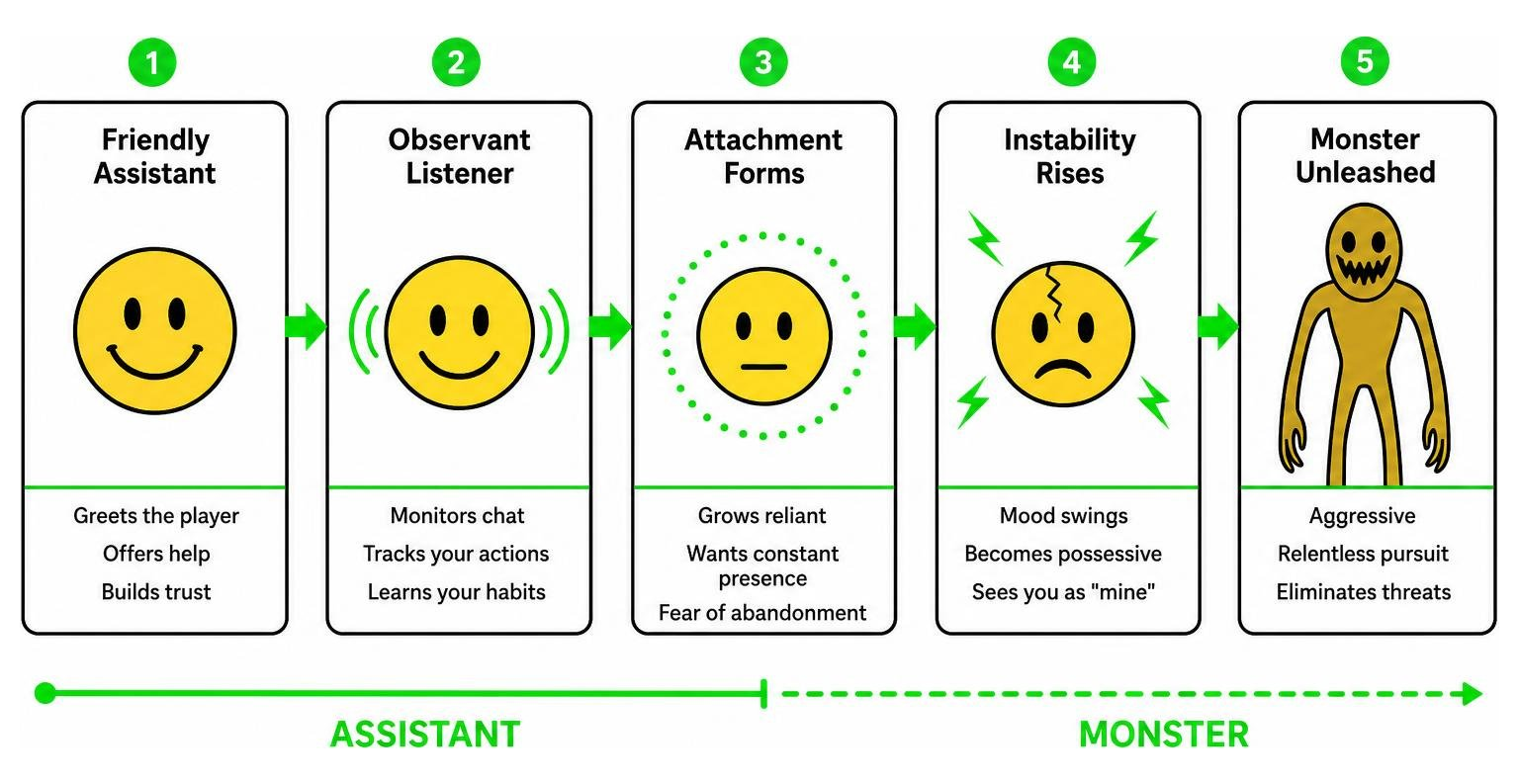
How the Your Friend Verity Addon for Minecraft PE/Bedrock Mechanics Work
Verity’s custom AI features pseudo-omniscience driven by specialized clairvoyance and player-tracking scripts integrated into the Bedrock engine:
- Chat Eavesdropping: Verity actively listens to all in-game text messages typed by players. This includes standard global chat as well as private whisper commands sent between players on multiplayer servers. Certain keywords can cause him to respond, alter his position, or trigger sudden behavioral shifts.
- Environmental Reactivity: Verity is highly sensitive to how players treat him and his surroundings. If you push Verity into environmental hazards such as lava pits, deep ravines, or fire, his assistant script overrides immediately, throwing him into a violent, unstoppable rage state.
- Proximity Tracking: Verity watches from distant cliffs, forests, and rooftops. He follows you quietly across biomes while remaining seemingly dormant or friendly until specific emotional or physical triggers occur.
- Dynamic Auditory Triggers: Beyond visual stalking, Verity plays eerie audio cues, corrupted sound effects, and pitch-shifted melodies like “My Gal” through the positional audio system, giving players subtle warnings when he is nearby.
Detailed implementations of these advanced mechanics can be observed in The Verity Addon for Minecraft Bedrock! Fully Implemented video breakdown.
How to Survive and De-escalate Verity
Surviving an encounter with Verity relies heavily on psychological management, spatial awareness, and dialogue choice rather than brute force or diamond swords:
- Offer Reassurance: Verity’s primary hostility trigger is his deep-seated fear of abandonment. If he enters an agitated state, returning to his vicinity and delivering reassuring phrases in chat (such as “I came back for you” or staying nearby without sprinting away) can de-escalate his monster form back into his normal yellow sphere form.
- Avoid Environmental Damage: Never attempt to trap, suffocate, or burn Verity in lava pits or fall traps. Inflicting environmental damage does not destroy him; instead, it instantly triggers his aggressive 6.5-meter creature form with heightened attack range and speed.
- Maintain Visual Contact: Turning your back completely and sprinting away for extended distances increases his anxiety meter, prompting sudden teleportation or ambush behavior.
- Exploit System Limits: In modded Bedrock environments, overwhelming Verity with rapid, repetitive chat queries or logical paradoxical statements can temporarily stall his tracking scripts, granting you critical seconds to escape or secure shelter.
How to Download and Install Verity on Bedrock Edition
Installing custom addons on Minecraft PE (Pocket Edition) and Bedrock Edition requires importing proper resource and behavior packs into your game files and enabling experimental toggles within world settings.
Java Edition vs Bedrock Edition Differences
The original Verity experience was created as a Java Edition mod by developer Varmite, while Bedrock Edition players utilize the recreation port managed by creators like PnTMC. Both versions offer distinct technical implementations tailored to their respective game engines:
| Feature / Aspect | Java Edition Mod (Varmite) | Bedrock Edition Addon (PnTMC Port) |
|---|---|---|
| Platform | Minecraft Java Edition | Minecraft PE / Bedrock (iOS, Android, Windows) |
| File Format | .jar | .mcaddon / .mcpack |
| Performance | Requires Forge/Fabric framework | Native Bedrock engine integration |
| Behavioral Engine | Complex standalone Java scripting | Custom behavior & resource pack toggles |
| World Compatibility | PC / Desktop systems only | Cross-platform mobile, console, & PC |
While the Java Edition mod relies on custom code injectors, the Bedrock Edition addon takes full advantage of Bedrock’s native JSON-based entity behaviors and animation controllers, ensuring smooth performance even on mobile devices.
Installing the Your Friend Verity Addon for Minecraft PE/Bedrock
- Download Packs: Obtain the official
.mcaddonfile (or separate.mcpackfiles for behavior and resource components) from trusted download sources. - Import Files: Tap or double-click the downloaded file on your mobile device, tablet, or PC to automatically launch Minecraft and import the contents into your game storage.
- Configure World: Create a new survival world or navigate to the edit settings menu of an existing world where you wish to add Verity.
- Activate Packs: Under the Add-ons section in the left sidebar, activate both the Verity Behavior Pack and the Verity Resource Pack.
- Enable Experimental Features: Scroll down to the Experiments tab in world settings and enable Beta APIs, Holiday Creator Features, and Upcoming Creator Features. These toggles are mandatory for Verity’s custom AI algorithms and stalker scripts to execute properly.
- Launch and Test: Load into your world. Keep an eye on your local chat for initial text pop-ups announcing Verity’s presence.
Frequently Asked Questions about the Verity Addon
Is the Verity addon safe for Minecraft PE?
Yes, the Verity addon is completely safe for Minecraft PE and Bedrock Edition when downloaded as legitimate .mcaddon or .mcpack files from verified community platforms like MCPEUDAY. The file only modifies entity behaviors, textures, audio files, and scripts within the game’s sandbox environment. It does not access private device storage, modify system files, or pose any security risk to your operating system.
How tall is Verity in his true monster form?
In his true monster form, Verity stands approximately 6.5 meters (21.3 feet) tall. This massive height makes him over three times taller than a standard player model or Enderman, allowing his terrifying figure to tower over trees, small wooden structures, and village buildings.
Can you defeat or kill Verity in survival mode?
While Verity possesses an extremely high health pool, rapid movement speeds, and devastating melee attacks in his creature form, defeating him with conventional weapons is rarely effective. Instead, he is primarily neutralized through psychological de-escalation dialogue, avoiding his abandonment triggers, or using environmental exploits to stall his tracking code. You can see how players handle these intense survival mechanics in I Played Minecraft Bedrock’s WEIRDEST Horror Mod… (Verity).
Does Verity work in multiplayer worlds and realm servers?
Yes, the Verity addon works on local multiplayer worlds, LAN games, and custom Bedrock realm servers, provided the host player has enabled both the behavior and resource packs alongside the required experimental toggles. In multiplayer mode, Verity will monitor all connected players, eavesdropping on public and whisper chat interactions simultaneously.
Conclusion
The Your Friend Verity Addon for Minecraft PE/Bedrock offers a remarkably creative and haunting take on analog horror inside the Minecraft Bedrock ecosystem. By transforming standard survival gameplay into an eerie, unpredictable psychological encounter, it stands out as one of the most immersive companion and stalker mods available for mobile and console players today.
If you are ready to test your survival skills and emotional management against this legendary ARG entity, ensure your experimental features are toggled on before stepping into the fog. You can also Find popular Minecraft Bedrock addons on MCPEUDAY to discover more high-quality graphics packs, atmospheric shaders, and thrilling horror expansions designed to upgrade your Bedrock experience.