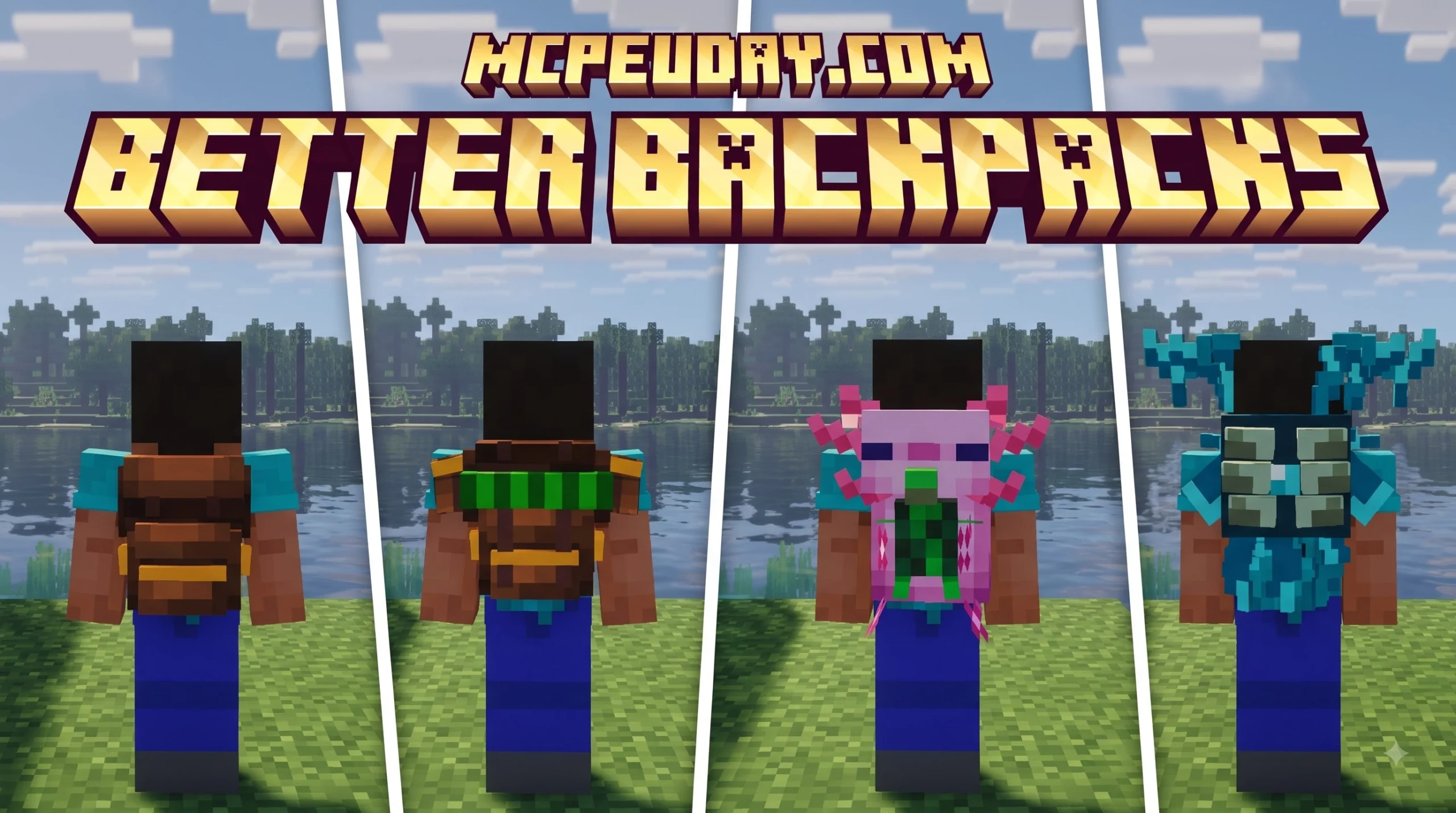
Running Out of Inventory Space? The Better Backpacks Addon Has You Covered
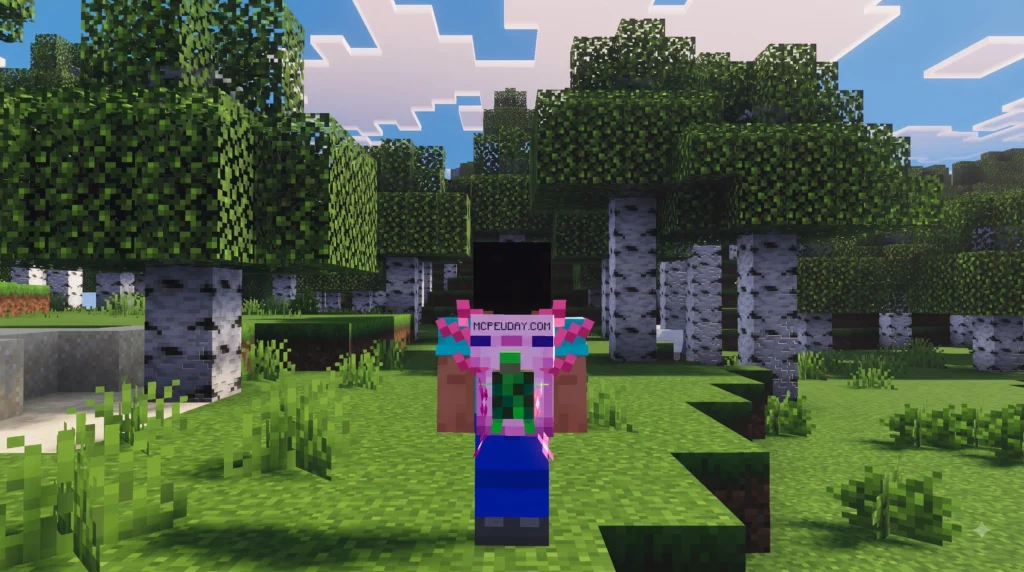
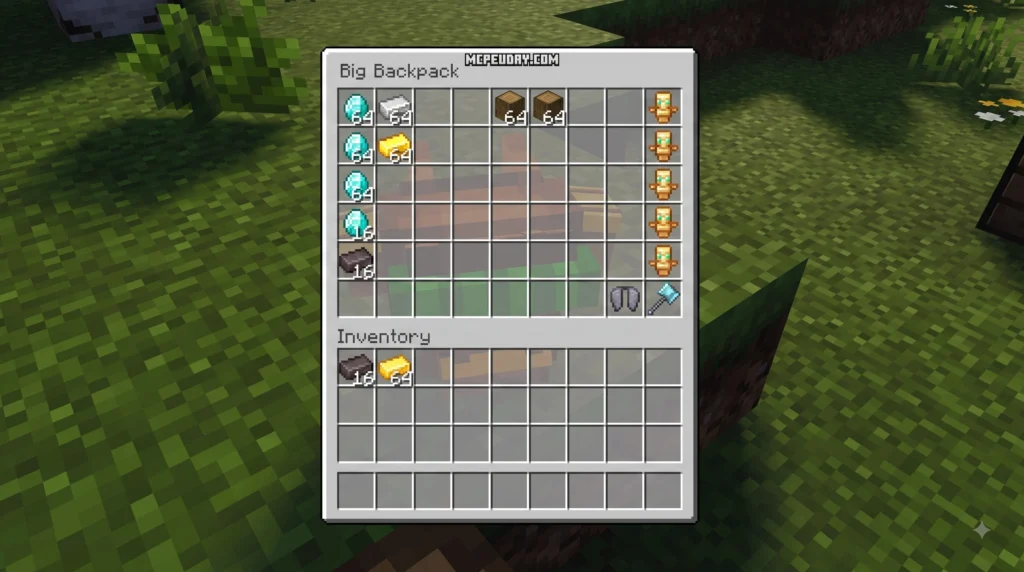
The Better Backpacks Addon is a portable storage expansion for Minecraft that adds tiered backpacks you can wear, place in the world, and customize — all without losing your items. Here is a quick summary of what it offers:
- What it is: A Minecraft addon/mod that adds wearable backpacks with multiple storage tiers
- Who it’s for: Java and Bedrock players who run out of inventory space during mining, caving, or long survival trips
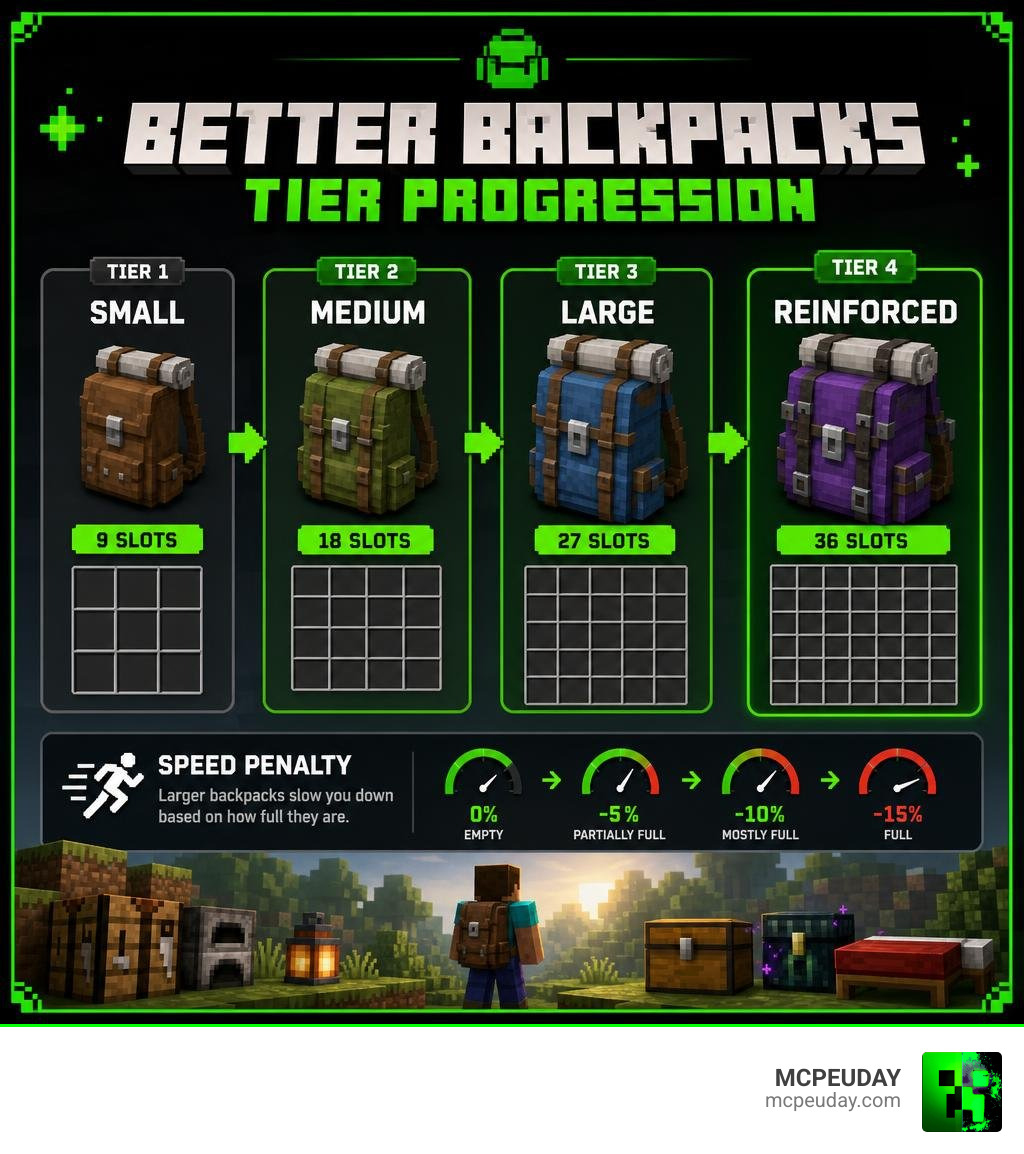
- Key tiers: Small (9 slots) to Medium (18 slots) to Large (27 slots) to Reinforced (36 slots), plus a special Nether variant
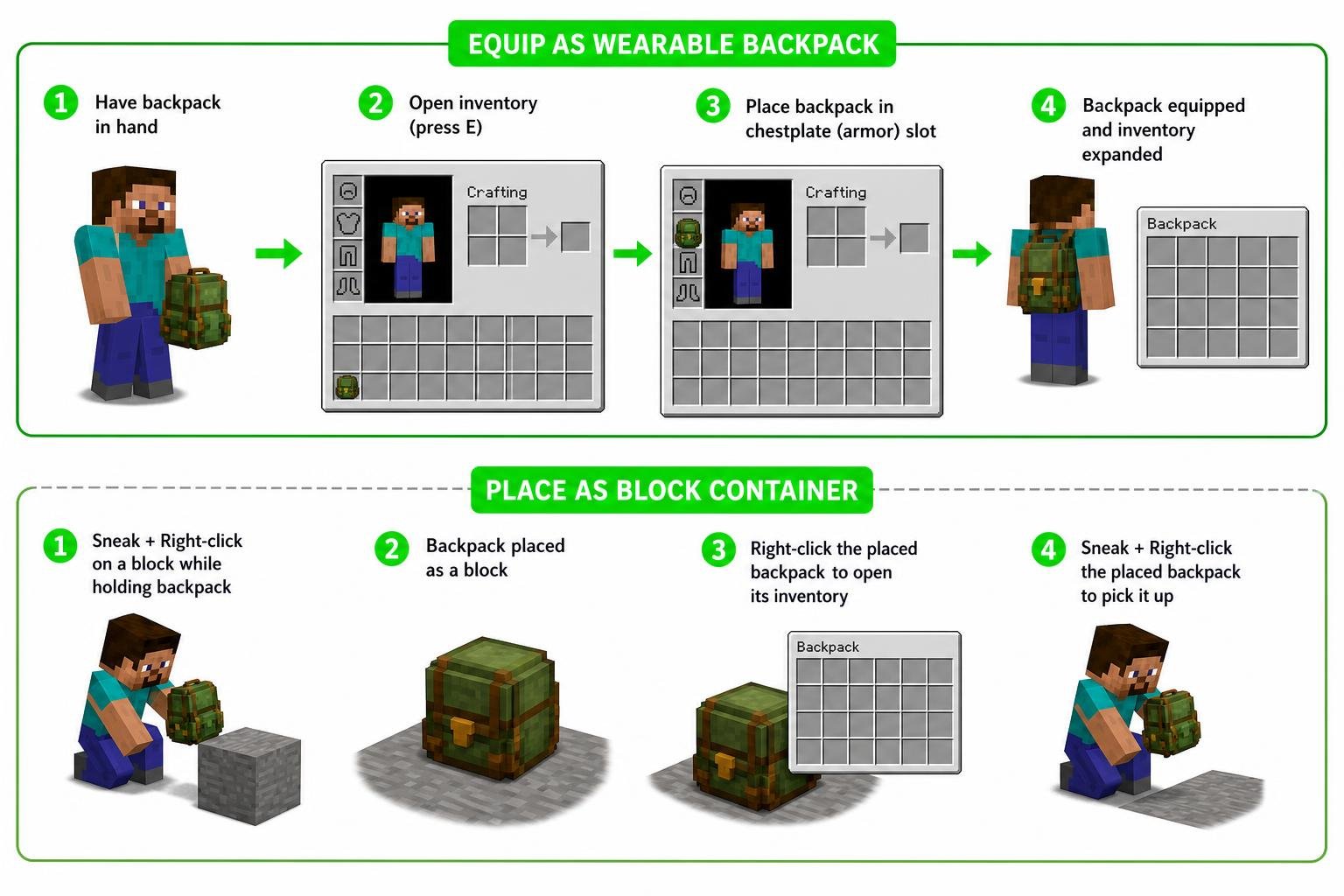
- How it works: Equip in your chestplate slot to expand inventory, or place it down like a chest — items stay safe either way
- Balance mechanics: Larger backpacks apply a movement speed penalty based on how full they are (up to -15%)
- Customization: Dye your backpack in multiple colors and rename it to keep things organized
- Dependencies vary by version — some builds require loaders like Babric and the HalpLibe framework
Whether you are tired of choosing between cobblestone and your iron pickaxe before leaving a cave, or you just want smarter inventory management on long expeditions, this addon solves that problem directly.
I’m UDAY GAMER from MCPEUDAY, and in this guide I’ll break down everything you need to know about the Better Backpacks Addon — from crafting and tiers to compatibility and installation — so you can get more out of every Minecraft session.
Core Features of the Better Backpacks Addon
When we set out on long mining trips or open-world exploration, standard player inventory fills up in minutes. The Better Backpacks Addon solves this classic problem by seamlessly integrating expanded containers into survival gameplay. Instead of cluttering your screen with separate menus or broken mechanics, it offers a clean, vanilla-friendly way to transport goods.
| Backpack Tier | Storage Capacity | Movement Penalty | Special Properties |
|---|---|---|---|
| Small Backpack | 9 Slots | 0% (Normal Speed) | Entry-level satchel for early game |
| Medium Backpack | 18 Slots | 0% (Normal Speed) | Balanced storage for basic caving |
| Large Backpack | 27 Slots | Up to -10% (Scales with contents) | Equivalent to a single chest |
| Reinforced Backpack | 36 Slots | Up to -15% (Scales with contents) | Maximum capacity tier |
| Nether Backpack | 27 Slots | 0% (Normal Speed) | Fire resistant, immune to lava destruction |
Tiered Inventory Progression and Storage Capacities
The addon organizes portable storage across distinct tiers. Starting with a basic Small Backpack gives you 9 additional inventory slots—just enough to carry essential ores and extra food. As your resource gathering expands, upgrading to Medium (18 slots), Large (27 slots), and Reinforced (36 slots) allows you to haul massive loot runs without constant trips back to base.
For hazardous dimensional travel, the Nether Backpack offers 27 slots while providing built-in fire resistance. If you drop it into lava or lose your footing in the Nether, your stored items won’t burn into ash.
Wearable Armor Slots vs World Block Placement
One of our favorite features is how versatile these backpacks are in the field. You can wear a backpack directly in your chestplate armor slot, which naturally extends your player inventory.
Alternatively, if you prefer to set up a temporary campsite or work with friends, you can place the backpack directly onto a block surface. By sneaking and right-clicking a block while holding the item, it places down as an interactive block inventory. Sneaking and right-clicking the placed block picks it right back up, preserving every single item stored inside without spilling loot across the ground.
Movement Penalties and Balancing Mechanics
To prevent inventory expansion from completely breaking survival balance, dynamic movement speed penalties are introduced. Carrying a massive, stuffed bag isn’t effortless!
Small, Medium, and Nether tiers offer standard player speed without penalties. However, Large and Reinforced tiers enforce dynamic weight debuffs:
- Empty state: 0% movement speed penalty.
- Partially full: Penalty scales dynamically based on total item weight and slot occupancy.
- Fully packed Large Backpack: Up to -10% movement speed reduction.
- Fully packed Reinforced Backpack: Up to -15% movement speed reduction.
This encourages strategic decisions: keep your Reinforced pack light during combat or boss fights, or switch to a Nether Backpack when fast movement and fire protection matter most.
Crafting, Upgrading, and Customization
Building your ideal backpack system is simple and intuitive. You can watch the Better Backpacks Addon showcase video to see the crafting recipes and visually dynamic equipment models in action.
Dyeing and Renaming Customization Systems
Personalizing your gear is easy. Backpacks support standard dye recipes, letting you color-code your bags for specific tasks—such as red for mining tools, green for farming supplies, or blue for valuable gems.
Some implementations even support two-tone dyeing! Placing dye to the left of the backpack in the crafting grid alters the main body color, while placing dye to the right customizes the accent trim. If you ever want to reset the color scheme, right-clicking on a water-filled cauldron washes off the dye. Furthermore, sneaking and right-clicking while holding the item allows you to assign custom display names to keep your storage organized.
Inventory Management and GUI Integration
The user interface is designed to blend smoothly into default gameplay screens. Equipping a backpack extends the main inventory GUI directly, eliminating the need to memorize clunky hotkeys or open separate laggy menus. Quick item transfer, shift-clicking, and basic sorting work natively alongside standard container controls.
Compatibility, Frameworks, and Installation
Depending on whether you play on Bedrock Edition or Java modded frameworks (such as Better Than Adventure or legacy survival builds), installation methods vary slightly. You can inspect backend development and structure by exploring open source repositories: explore the Better With Bags repository or check out the BTA Backpacks source code to see how Java modders structure these systems.
How to Install and Enable the Better Backpacks Addon
For Minecraft Bedrock players:
- Download the
.mcpackor.addonfiles directly or obtain them via official creators. - Open the file to automatically import it into Minecraft.
- Edit your World Settings, scroll to Resource Packs and Behavior Packs, and activate the addon in both menus.
- Ensure Experimental Gameplay features (such as Custom Biomes or Holiday Creator Features) are toggled on if required by the specific build.
For Java / BTA framework players:
- Ensure you have the compatible base launcher version (such as BTA 1.7.7.0_02).
- Install the Babric mod loader alongside required library files like HalpLibe.
- Drop the backpack mod jar file into your
.minecraft/modsdirectory and launch the game.
Understanding the Better Backpacks Addon Progression
The addon is designed to fit naturally into overhaul modpacks like Better Than Adventure (BTA) or Better Than Wolves (BTW). In hard survival environments where resource gathering requires real effort, tiered bags smooth out early-game inventory crunch without undermining core survival difficulty.
Comparing Popular Portable Storage Mods
How does this addon stack up against giant modded storage frameworks across the Minecraft community? Let me compare the landscape.
You can view native Bedrock DLC options directly on the Official Minecraft Marketplace Add-on Page.
Key Differences in Upgrades and Automation
In the broader Java modding scene, mods like Sophisticated Backpacks dominate with over 225 million downloads on CurseForge. Sophisticated Backpacks features 6 tiers (Leather, Copper, Iron, Gold, Diamond, Netherite) and hyper-complex modular upgrades including stack multipliers (from 2x up to 16x), auto-feeding upgrades, magnet upgrades, void deletion, and fluid handling.
By contrast, the Better Backpacks Addon focuses on streamlined vanilla balance. Rather than turning a bag into an automated sorting machine, it keeps the experience grounded in classic survival utility: expand your inventory slots, manage full-weight movement penalties, and enjoy placeable block interaction.
Frequently Asked Questions About Backpack Addons
What is the maximum storage capacity available in the Better Backpacks Addon?
The maximum non-modular slot capacity is offered by the Reinforced Backpack, which provides 36 additional inventory slots (equivalent to 4 full inventory rows).
How do dynamic speed penalties affect player movement?
Dynamic speed penalties slow down player movement based on how many item stacks are placed inside Large or Reinforced tiers. Empty backpacks cause 0% penalty, while a fully packed Reinforced Backpack reduces movement speed by up to 15%.
Can you place backpacks down in the world without losing items?
Yes! By sneaking and right-clicking a block surface, you place the backpack down like a chest. Sneaking and right-clicking the block picks it up with all stored items retained inside.
Conclusion
Finding the right inventory balance is vital for enjoying long Minecraft sessions. The Better Backpacks Addon delivers clean tier progression, balanced weight penalties, and smooth aesthetic customization, making it an essential utility for survival miners and explorers alike.
At MCPEUDAY, we aim to deliver honest guides and clear resources to help you build the best gaming experience possible. Be sure to find the latest Minecraft mods and addon guides on MCPEUDAY for more mod breakdowns, technical tutorials, and survival upgrades!

1 thought on “Better Backpacks Addon (26.x, 1.21) – MCPE/Bedrock Mod”