Minecraft is fun with friends—but what if no one is online? That’s where the AI Multiplayer Addon (26.x) becomes exciting.
This addon adds intelligent AI-controlled players into your Minecraft Bedrock world. These bot players can move, fight, explore, and behave like real teammates or enemies, making solo gameplay feel like multiplayer.
If you want a more dynamic world without needing real players online, this addon is worth trying.
Table of Contents
What is AI Multiplayer Addon?
The AI Multiplayer Addon is a Minecraft Bedrock addon that simulates multiplayer gameplay by adding AI players (bots) into your world.
These AI characters act like real players by:
- Walking around the world
- Following targets
- Fighting mobs
- Helping in combat
- Creating more activity in empty worlds
It’s a creative way to make single-player Minecraft feel more alive.
Why Players Love AI Multiplayer Addon
Many MCPE players enjoy survival mode but don’t always have friends online. This addon solves that problem by giving your world active companions.
Key Benefits:
- Makes solo worlds feel multiplayer
- Adds action and movement around your base
- Can assist during battles
- Great for roleplay maps
- Fun for content creators and challenges
Features of AI Multiplayer Addon (26.x)
The latest 26.x version brings smoother gameplay and better compatibility with newer Minecraft Bedrock versions.
Smart AI Player Behavior
AI characters can:
- Move naturally
- Roam the map
- React to nearby enemies
- Follow combat situations
This makes them feel more realistic than static mobs.
Better Combat Support
Some AI players can help fight hostile mobs such as:
- Zombies
- Skeletons
- Creepers
- Other threats
This adds support in survival mode.
Multiplayer Feeling in Solo Worlds
Your world feels less empty because bots move around and create activity.
Lightweight Performance
The addon is designed to run on mobile devices without heavy lag if used properly.
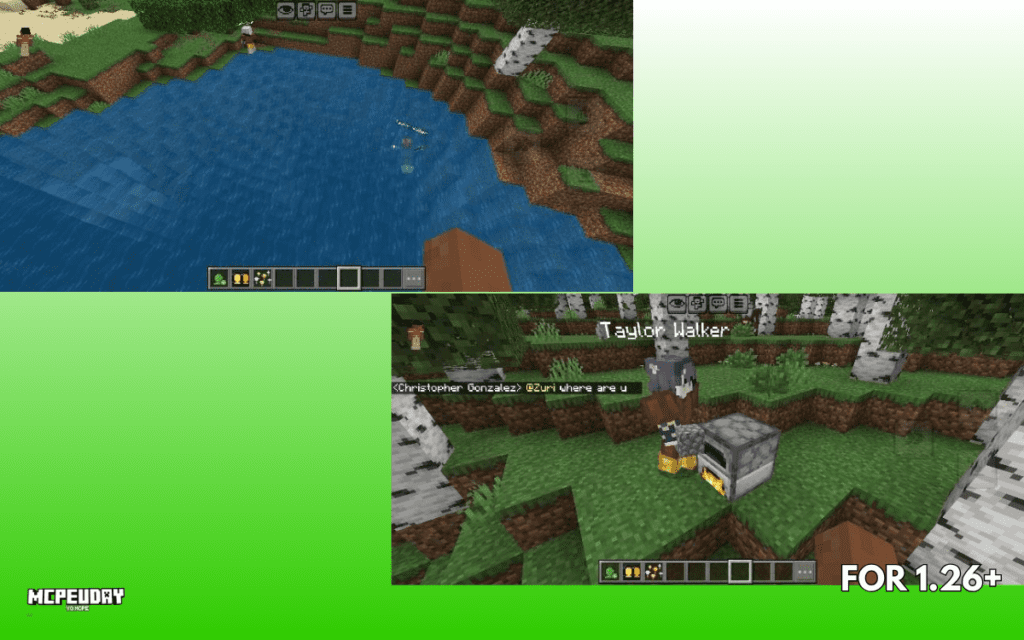
Screenshots:-
How AI Multiplayer Addon Works
After enabling the addon, AI players spawn into your world depending on the addon settings.
What They Can Do
- Walk around bases
- Explore land nearby
- Engage enemies
- Follow patterns or commands (varies by version)
What They Cannot Fully Replace
They are still AI bots—not real human players. So don’t expect advanced building logic or full chat behavior.
How to Install AI Multiplayer Addon in MCPE
Installing the AI Multiplayer Addon is simple.
Step 1: Download the Addon
Get the .mcpack or addon files from a trusted source.
Step 2: Open in Minecraft
Tap the downloaded file and let Minecraft import it.
Step 3: Activate Packs
Inside world settings:
- Enable Behavior Pack
- Enable Resource Pack (if included)
Step 4: Create or Load World
Enter the world and test the AI players.
Supported Versions
The AI Multiplayer Addon (26.x) is mainly designed for modern Bedrock builds.
Common Supported Platforms
- Android
- iOS
- Windows Bedrock Edition
- Some consoles (depends on file access support)
Minecraft Version
- Compatible with Minecraft 1.21+ in most updated releases
Pros and Cons of AI Multiplayer Addon
Pros
- Makes solo gameplay more fun
- Adds life to empty worlds
- Great for roleplay and maps
- Useful for combat assistance
- Easy to install
Cons
- Bots are not equal to real players
- Too many AI mobs may reduce FPS on weak devices
- Some behavior may look repetitive
My Honest Experience Using AI Multiplayer Addon
I tested this type of addon in a survival world where I usually play alone.
The biggest difference was atmosphere.
Normally, solo worlds can feel silent after some time. With AI players moving nearby, fighting mobs, and roaming the area, the world felt more active.
For creators making YouTube videos or challenge content, this addon can be especially fun.
Best Ways to Use AI Multiplayer Addon
Survival Worlds
Use AI bots for backup during night exploration.
Roleplay Maps
Create villages, armies, or city life.
Challenge Videos
Try “100 days with AI teammates” style gameplay.
Base Defense
Use bots near your base for extra support.
FAQs About AI Multiplayer Addon
Is AI Multiplayer Addon safe to use?
Yes, if downloaded from a trusted addon website.
Does it need internet?
No. It works offline after installation.
Can AI players build houses?
Usually no. Most versions focus on movement and combat.
Will it lag my phone?
If you spawn too many AI players, weaker devices may lag.
Is AI Multiplayer Addon free?
Most versions are free to download.
Final Verdict – Is AI Multiplayer Addon Worth It?
If you mostly play Minecraft alone and want a world that feels alive, the AI Multiplayer Addon is a great choice.
It won’t fully replace real friends, but it adds movement, action, and fun to solo gameplay.
For MCPE players who enjoy experiments, roleplay, or survival challenges, it’s definitely worth testing.
3 thoughts on “AI Multiplayer Addon (26.x) for MCPE – Smart AI Teammates in Minecraft”