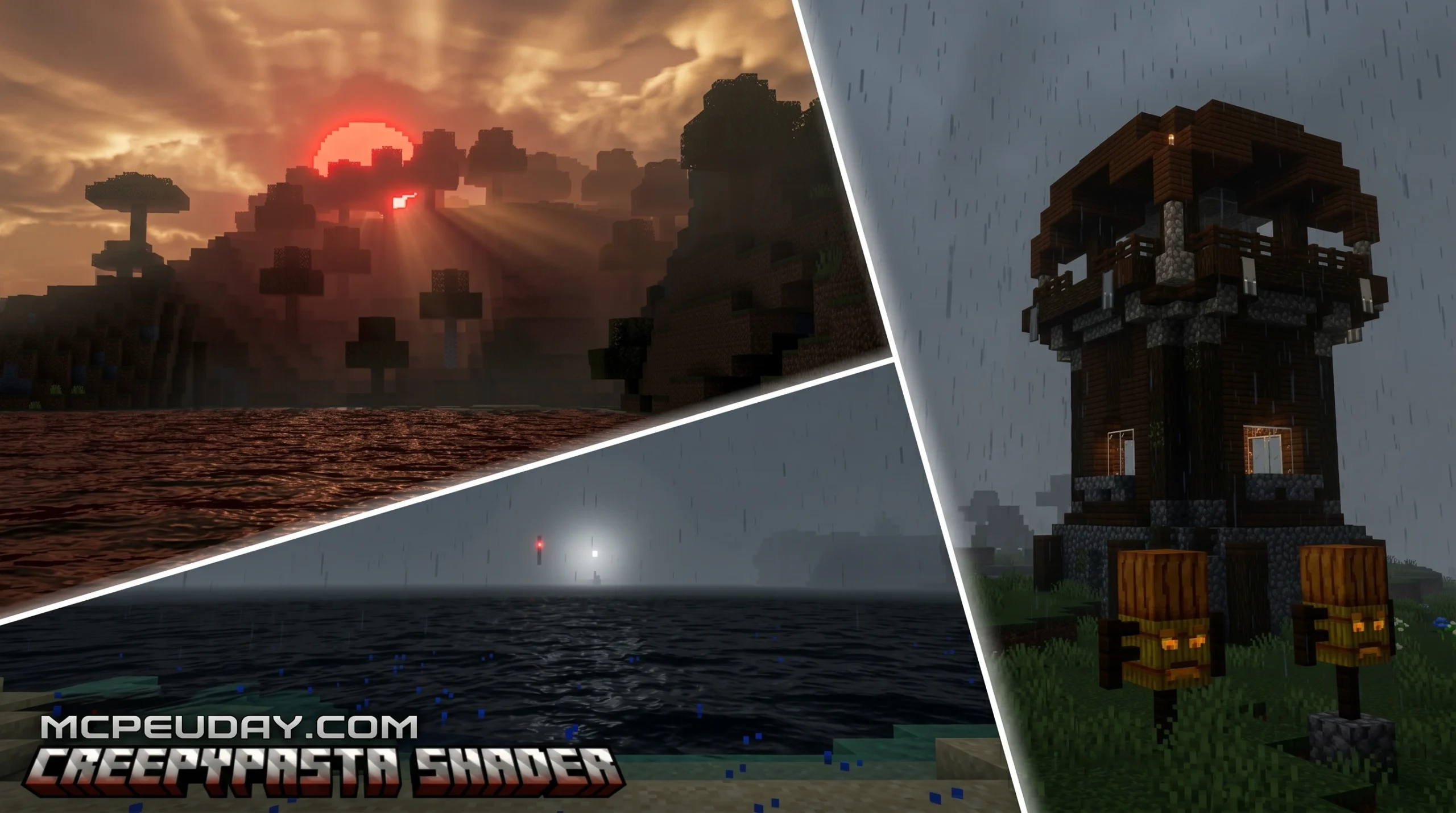
What the Creepypasta Shader Does to Your Minecraft World
The Creepypasta Shader turns your normal Minecraft world into something genuinely unsettling. If you want the quick answer:
What it is: A Bedrock/MCPE shader that replaces Minecraft’s bright, cheerful visuals with a dark, horror-themed atmosphere.
Key effects:
- Gray, overcast sky
- Blood rain
- Blood moon at night
- Dim, gloomy lighting across all terrain
File format: .mcpack (266.18 KB) Supported versions: Minecraft PE / Bedrock Edition 1.21 (26.x) How to install: Download the .mcpack file → tap to import → activate in Global Resources
Vanilla Minecraft feels safe and familiar. The Creepypasta Shader makes it feel like you’ve loaded into a completely different game. Think Silent Hill — muted colors, eerie fog, and a constant sense that something is wrong.
It doesn’t change how the game plays. It changes how the game feels. And for horror fans, that difference is everything.
In this guide, we’ll walk you through exactly how to download and install it in three simple steps.
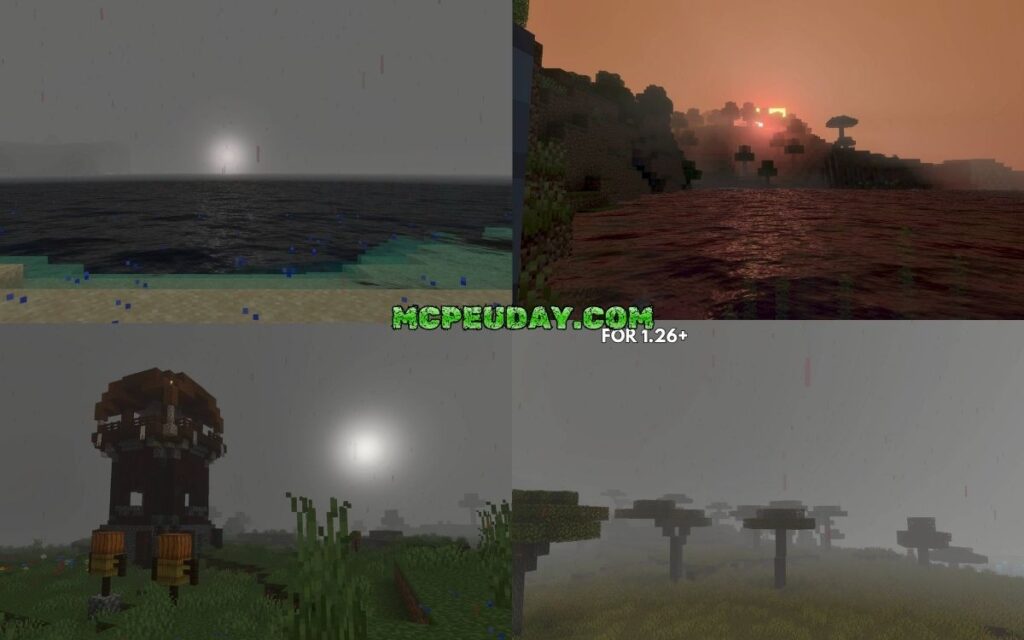
What is the Creepypasta Shader?
The Creepypasta Shader is a specialized graphics modification designed specifically for Minecraft Bedrock Edition (MCPE). Unlike traditional shaders that strive to make your world look like a high-end, sun-drenched paradise, this pack takes a sharp turn into the dark. It is heavily inspired by classic survival horror aesthetics, drawing visual cues from legendary franchises like Silent Hill and the deep lore of early internet creepy stories.
By stripping away the vibrant, saturated colors of the vanilla game, it creates an atmosphere of psychological dread. Every block, tree, and horizon line is recontextualized under a blanket of heavy, oppressive mist. If you have ever spent hours reading stories on the Minecraft CreepyPasta Wiki, you know how deeply rooted the desire for a truly scary Minecraft experience is. This shader brings those text-based nightmares to life, turning your sandbox into an interactive horror movie where you are the target.
Visual Features of the Creepypasta Shader
When you load into a world with the Creepypasta Shader active, the first thing you will notice is the sky. The bright blue daytime dome is completely gone, replaced by an eternal, overcast gray sky. This dim setting casts a somber, sleepy glow over the entire landscape. It makes even the most familiar biomes feel alien and hostile.
The standout features of this pack include:
- The Gray Sky Atmosphere: A permanent fog that hangs over the horizon, limiting your view and making you wonder what is lurking just beyond the render distance.
- Blood Rain: When a storm hits, the water drops are replaced by a striking crimson color, transforming a simple rainstorm into an apocalyptic event.
- The Blood Moon: At night, the moon glows with a deep, menacing red, casting eerie shadows across the terrain and amplifying the horror element.
- Muted Color Palette: The greens of the grass and the blues of the water are severely desaturated, giving the entire world a decayed, vintage look.
To achieve these stylized, retro-horror visual anomalies, developers often look at advanced rendering techniques. For example, some creators use ideas similar to the analog noise and visual distortion principles found in glitchy.glsl at main · 0xhckr/ghostty-shaders to design custom screen-space glitch effects. While this shader is lightweight, it successfully mimics that high-tension, distorted aesthetic directly on mobile devices.
Supported Versions and Platforms
A major advantage of this shader is its accessibility. It is built specifically for Minecraft Bedrock Edition (which includes Minecraft PE on iOS and Android, Windows 10/11, and compatible consoles). It is fully updated to support the 1.21 update cycle (often referred to as the 26.x version range).
Because it is optimized for Bedrock’s rendering engine, it does not require a massive, power-hungry gaming PC to run. Whether you are playing on a mid-range Android phone, an iPad, or a laptop, you can enjoy these spooky visuals without turning your device into a portable heater. If you want to see how this horror aesthetic compares to other popular visual modifications in 2026, you can check out our guide on the Best Shaders for MCPE 1.21 2026 Top 3 Realistic Minecraft PE Shaders.
Atmospheric and Gameplay Impact
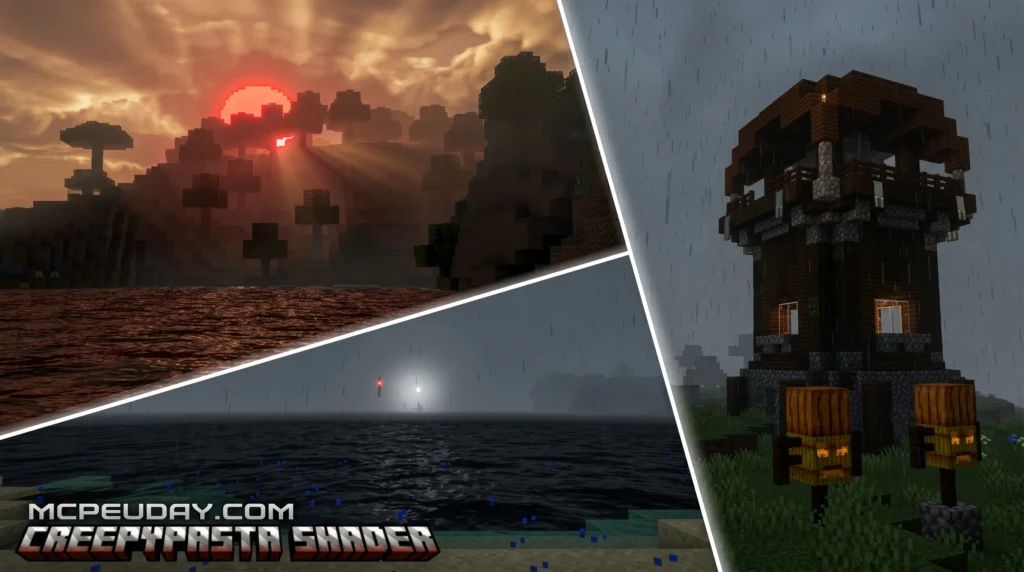
Using the Creepypasta Shader fundamentally alters your gameplay mindset. In vanilla Minecraft, nightfall is simply a minor inconvenience—you either sleep through it or light up your base with a few torches. With this shader active, night becomes a psychological challenge. The blood moon turns the landscape into a dark, red-tinted nightmare where every shadow looks like a hostile mob waiting to strike.
The terrain becomes completely unfamiliar. Hills you have climbed a hundred times suddenly look menacing under the gray, filtered light. This makes the pack incredible for taking dramatic horror screenshots or recording creepy gameplay footage for social media.
To enhance this retro, unsettling feeling, some players love to pair their horror worlds with post-processing styles reminiscent of old CRT monitors. The math behind simulating these vintage displays—such as adding subtle scan lines, screen curvature, and color fringing—is beautifully demonstrated in projects like in-game-crt.glsl at main · 0xhckr/ghostty-shaders. While the Creepypasta Shader focuses primarily on lighting and skybox changes, the combination of a dim, gloomy setting with retro visual styles makes survival feel incredibly tense and rewarding.
Comparison with Realistic Shaders
It is important to understand that horror shaders serve a completely different purpose than traditional graphics packs. While realistic shaders focus on dynamic water reflections, waving leaves, and sunbeams, the Creepypasta Shader intentionally strips away these beautiful elements to create a sense of isolation.
| Feature | Realistic Shaders (e.g., Newb, Complementary) | Creepypasta Shader |
|---|---|---|
| Primary Goal | Enhance beauty, realism, and immersion | Create dread, tension, and a horror atmosphere |
| Skybox | Realistic clouds, sun flares, clear blue skies | Overcast gray skies, Blood Moon, Blood Rain |
| Color Profile | Vibrant, saturated, warm colors | Desaturated, cold, muted tones |
| Performance Impact | Moderate to High (requires good hardware) | Very Low (highly optimized for mobile) |
If you are looking for gorgeous, ultra-realistic graphics, you might want to read about the Top 5 Best Realistic Shaders for MCPE or check out our in-depth review of the Newb Complementary Unbound Shader The Most Realistic Shader That Transforms Minecraft Completely 2026. However, if you are tired of the same old bright views and want a survival experience that actually makes your heart race, the creepy approach is the way to go.
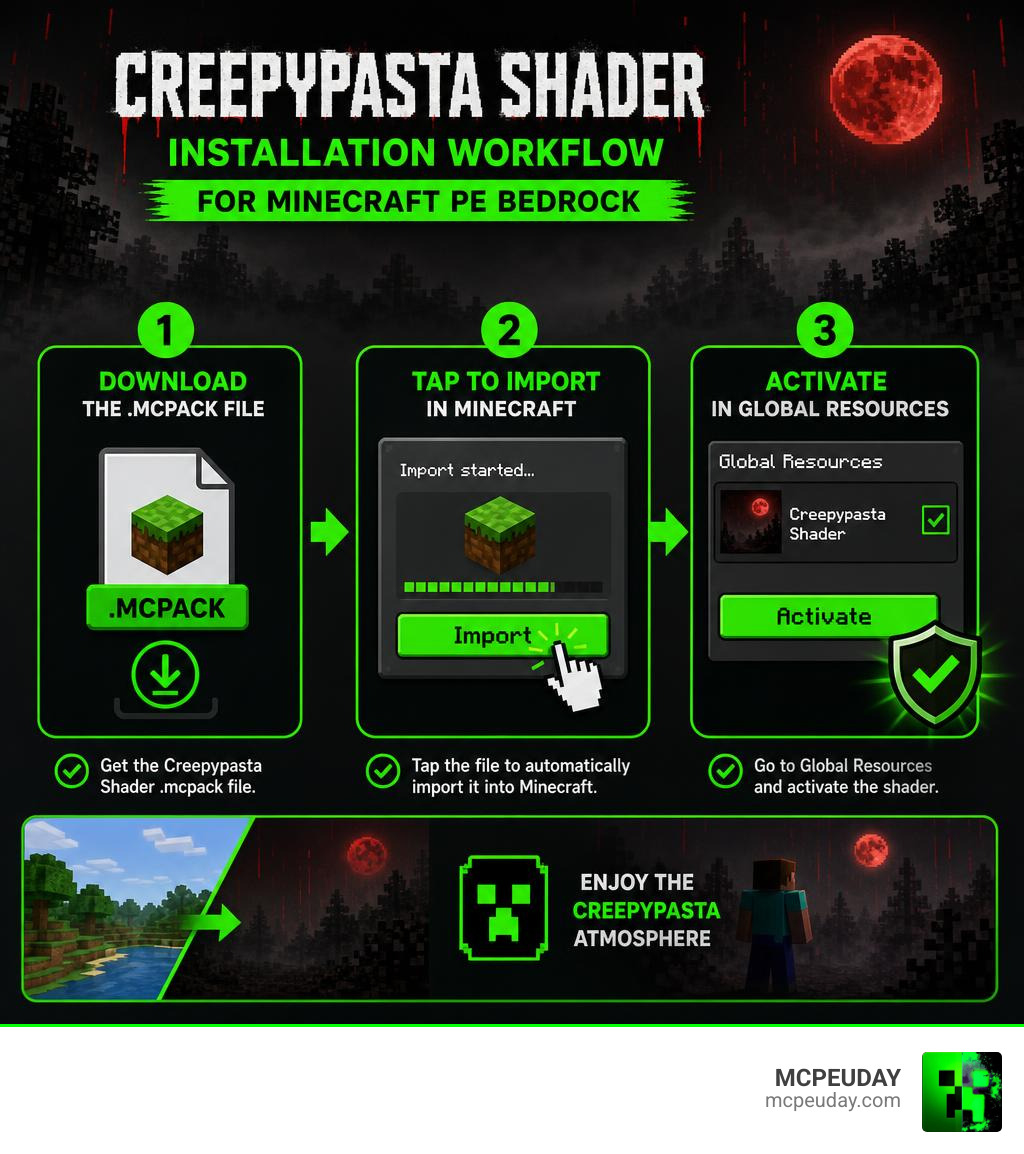
How to Install the Shader in 3 Easy Steps
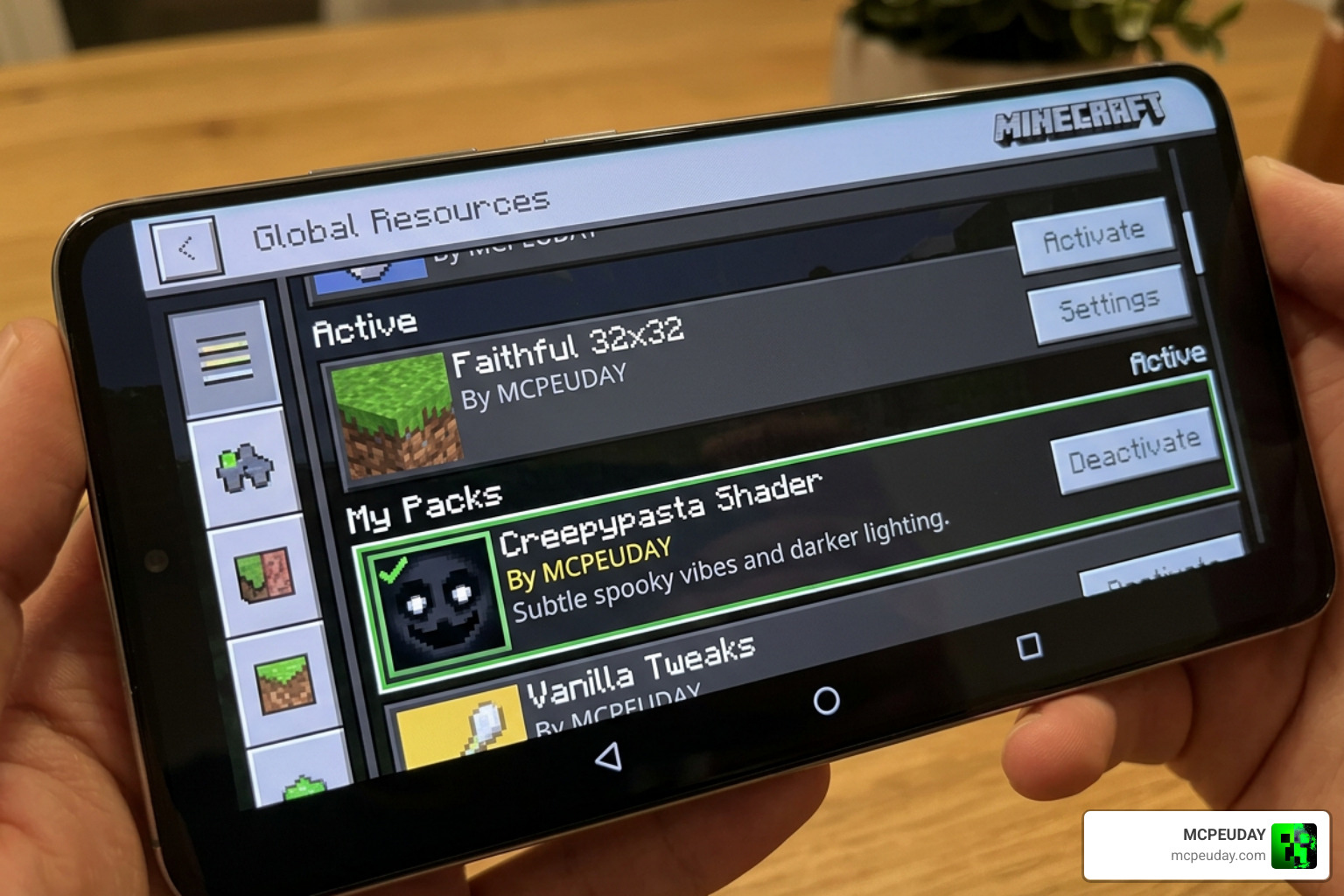
Installing custom graphics packs on mobile devices can sometimes feel intimidating, but Bedrock Edition makes it remarkably simple thanks to the .mcpack format. This format is designed to be recognized automatically by your system, allowing for a seamless integration process. Follow our simple, three-step guide below to get started.
Step 1: Download the Creepypasta Shader File
First, you need to grab the official, safe file. The pack is incredibly lightweight, coming in at a mere 266.18 KB, meaning it will download in a matter of seconds even on slower connections.
Currently, the primary download link for the pack has recorded over 680 downloads, with an additional 37 downloads logged on the MCDL Minecraft Addons directory. You can securely download the file directly from the Creepypasta Shader (26.x, 1.21) – MCPE/Bedrock Mod – 9Minecraft page. Make sure to save the file to a location you can easily access on your device, such as your “Downloads” folder.
Step 2: Import the MCPack to Minecraft PE
Once the download is complete, you need to import it into your game.
- On Android: Open your preferred File Manager app, navigate to your Downloads folder, and find
creepypasta-shader-1_1.mcpack. Tap on the file. If prompted, select “Open with Minecraft.” - On iOS: Open the Files app, locate the downloaded file, and tap it. Your device will automatically launch Minecraft and begin the import process.
- On Windows 10/11: Simply double-click the downloaded
.mcpackfile, and Minecraft will open automatically.
You will see a notification at the top of your Minecraft screen saying “Import Started” followed by “Successfully Imported Creepypasta Shader.”
Step 3: Activate the Shader in Global Resources
Now that the file is safely inside your game directory, it is time to turn it on!
- Launch Minecraft and navigate to the main menu.
- Click on Settings, then scroll down the left-hand sidebar until you find Global Resources.
- Click on My Packs to expand the list. You should see the Creepypasta Shader listed there.
- Select the shader and click the Activate button.
- Exit the Settings menu. The game will show a brief loading screen as it loads the new horror resources.
Once the loading screen disappears, your main menu background and all subsequent worlds you load into will be transformed by the creepy new style!
Frequently Asked Questions about Horror Shaders
To help you get the absolute most out of your spooky new setup, we have compiled answers to some of the most common questions players ask when diving into Minecraft horror mods. If you want a broader look at what is available in the community, you can check out this external video showcasing the Top 10 Best Minecraft Horror Shaders (2025) – YouTube.
What versions of Minecraft PE are supported?
The Creepypasta Shader is fully optimized for the 1.21 update and is compatible with the latest 26.x versions of Bedrock Edition. Because it utilizes standard resource-mapping techniques rather than complex rendering pipelines that frequently break during game updates, it enjoys excellent stability across different Bedrock builds.
Does this shader cause lag on mobile devices?
Almost none! Unlike realistic packs that feature heavy performance-draining calculations, this pack has an incredibly small file size of just 266.18 KB. It achieves its gloomy, terrifying look by modifying existing textures, skyboxes, and fog parameters rather than injecting demanding real-time lighting code. It is highly optimized for budget mobile devices.
Can I use this shader with other horror mods?
Yes! In fact, we highly recommend it. Since this pack only alters the visual atmosphere (the sky, the rain, and the ambient lighting), it does not conflict with gameplay mods. You can pair it with custom entity add-ons, structure packs, or horror sound engines to build your ultimate custom horror modpack. Just make sure to load the shader at the top of your active resource list to ensure its skybox and fog override other files.
Conclusion
As we move through 2026, the demand for unique, atmospheric gameplay experiences in Minecraft continues to grow. The Creepypasta Shader stands out as an exceptional, lightweight solution for players who want to swap out the cozy, bright aesthetic of vanilla survival for a tense, Silent Hill-inspired adventure.
By following our simple 3-step installation guide, you can quickly convert your game into a beautifully eerie world defined by permanent fog, blood-red storms, and a chilling sense of isolation.
If you decide you want to switch back to a more traditional, gorgeous look after giving yourself a good scare, we have got you covered. Be sure to explore our curated list of the Best Shaders for MCPE 1.21 2026 Top 3 Realistic Minecraft PE Shaders to find the perfect visual balance for your next build. Keep your torches close, watch the red sky, and happy surviving!
