The Best Multiplayer Waypoint ADDON for Minecraft Bedrock in 2026
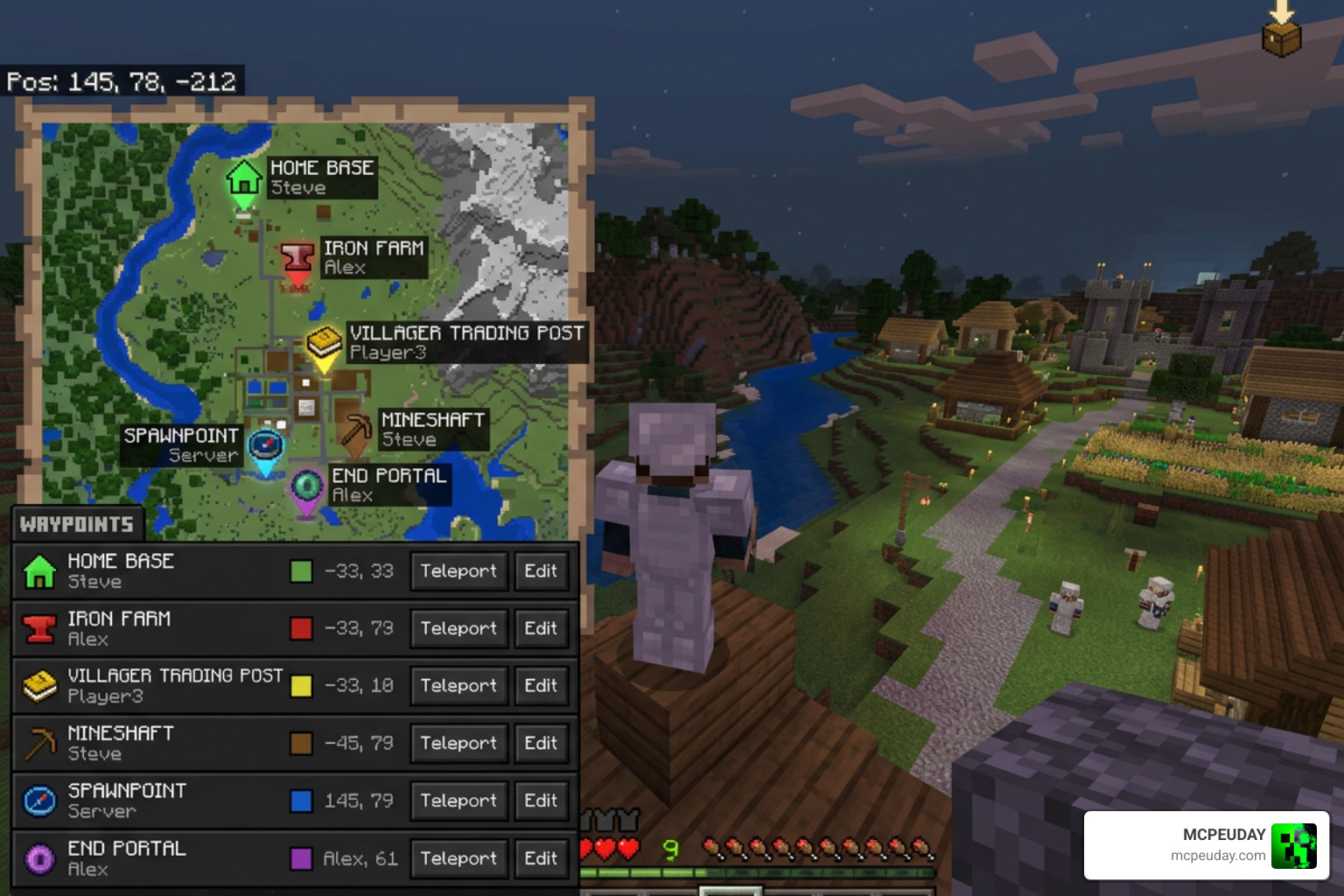
The Multiplayer Waypoint System ADDON is one of the most powerful navigation tools available for Minecraft Bedrock Edition right now. If you play on a server with friends and constantly get lost, this addon is exactly what you need.
Quick Answer: What does the Multiplayer Waypoint System ADDON do?
- Creates personal teleport points at any location in your world
- Supports up to 999 waypoints per player, per dimension (Overworld, Nether, and End)
- Lets players share and publish waypoints publicly for other players to visit
- Includes admin moderation tools for server owners
- Works on Minecraft Bedrock 1.19.10 and higher with no lag, even with 100+ players online
- Fully compatible with almost any other addon
Whether you’re marking your base, a farm, or a hidden treasure spot — this addon saves you from ever getting lost again.
It’s been downloaded over 1,391 times for the latest version alone, and players use it on everything from casual survival worlds to large multiplayer servers.
Think of it like dropping a pin on Google Maps, but inside Minecraft — and you can actually teleport there.
What is the Multiplayer Waypoint System ADDON?
The Multiplayer Waypoint System ADDON is a specialized navigation utility designed specifically for Bedrock Edition. Unlike basic teleportation commands that require cheats to be enabled, this addon introduces an immersive, menu-driven interface that integrates seamlessly into survival gameplay.
Whether you are hosting a small peer-to-peer world or running a dedicated server with 100 concurrent players, the addon ensures lag-free performance. It does not modify the player.json file, which is a massive win for compatibility. If you are curious about how Bedrock’s technical systems differ from Java’s, you can read our comparison on Minecraft Java vs Bedrock.
Key Features of the Multiplayer Waypoint System ADDON
This addon is packed with features designed to make multiplayer navigation effortless:
- Massive Waypoint Limits: Each player can save up to 999 unique waypoints per dimension (Overworld, Nether, and End), giving you a total of 2,997 waypoints.
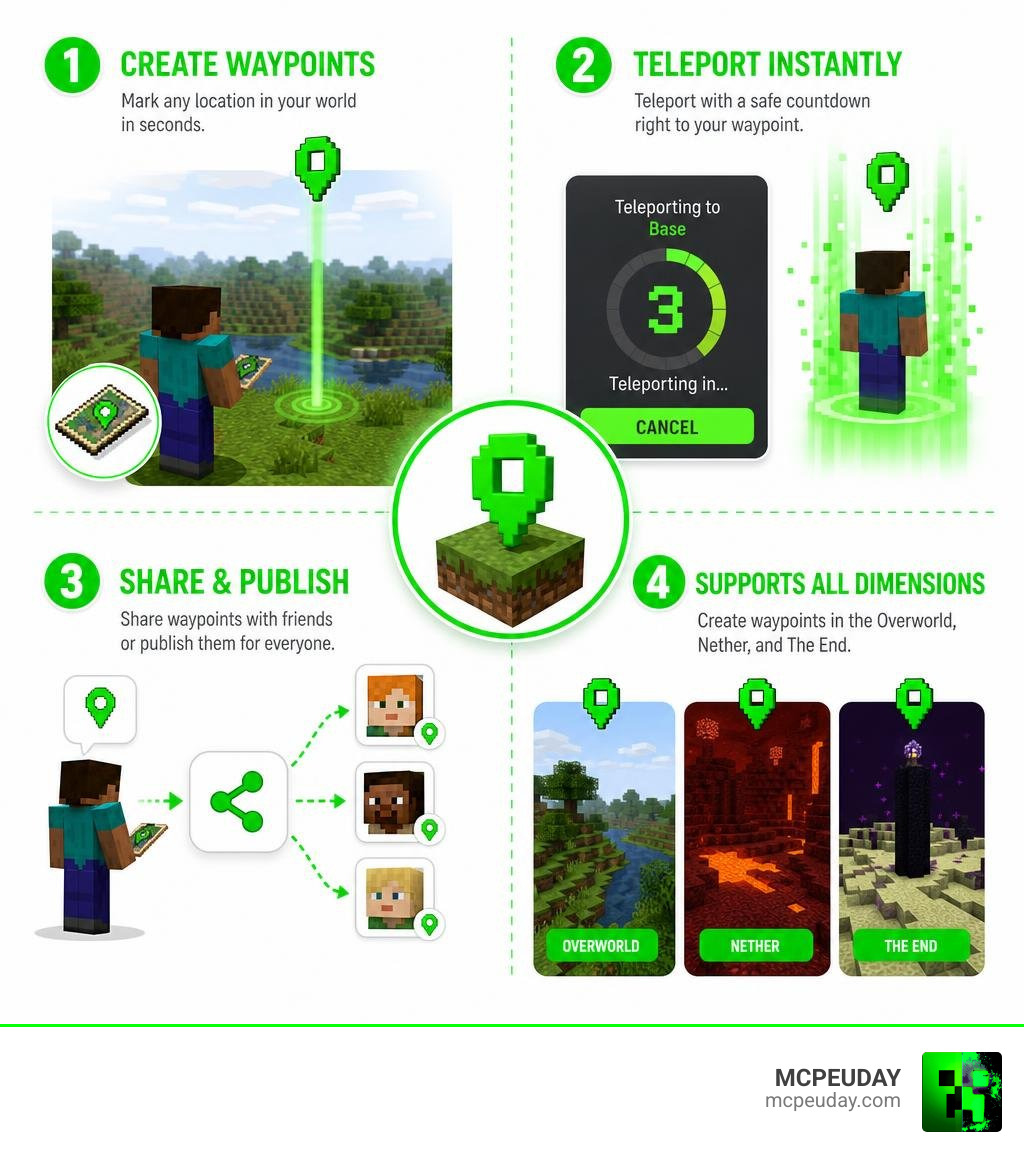
- Dimension Locking: The system automatically registers which dimension a waypoint is in, preventing players from accidentally teleporting across dimensions and causing game glitches.
- HUD Integration: Real-time distance and direction tracking help guide you directly to your destination.
- Custom Icons: Personalize your saved locations with visual Material icons to easily distinguish between your home base, mob farms, and mining shafts.
Waypoint Creation and Teleportation Mechanics
Creating a waypoint is incredibly simple. When you join a world with this addon active, you will receive a Waypoint Menu item in your inventory. Simply right-click or long-press the item to open the user interface.
From the menu, choose “Create new waypoint”, enter a custom name (up to 100 characters, which supports paragraph color codes using § for colorful names), select an icon, and hit submit.
To prevent players from abusing teleportation during PvP combat or dangerous situations, the addon features a motion-locked countdown timer. This timer can be configured by admins to last anywhere from 0 to 30 seconds (or even higher). If you move, jump, or take damage during this countdown, the teleportation is instantly canceled.
When a teleportation is successful, it plays a unique camera animation and emits vibrant purple particles. For distances over 150 blocks, the teleportation animation dynamically changes to make the journey feel truly magical.
Multiplayer Sharing and Moderation Tools
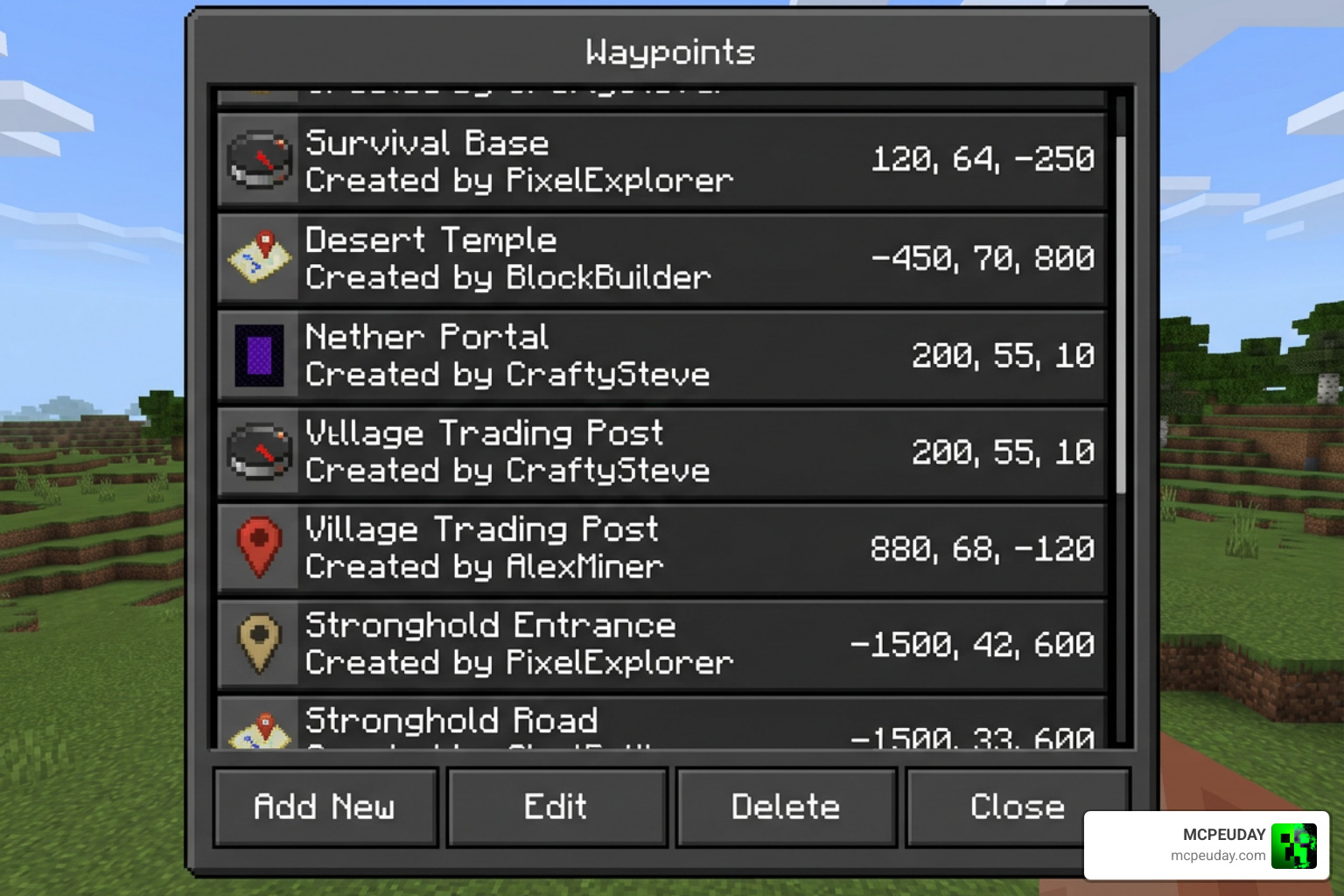
One of the standout features of the Multiplayer Waypoint System ADDON is its public sharing system. You are not just limited to personal waypoints; you can publish your favorite spots for the entire server to see!
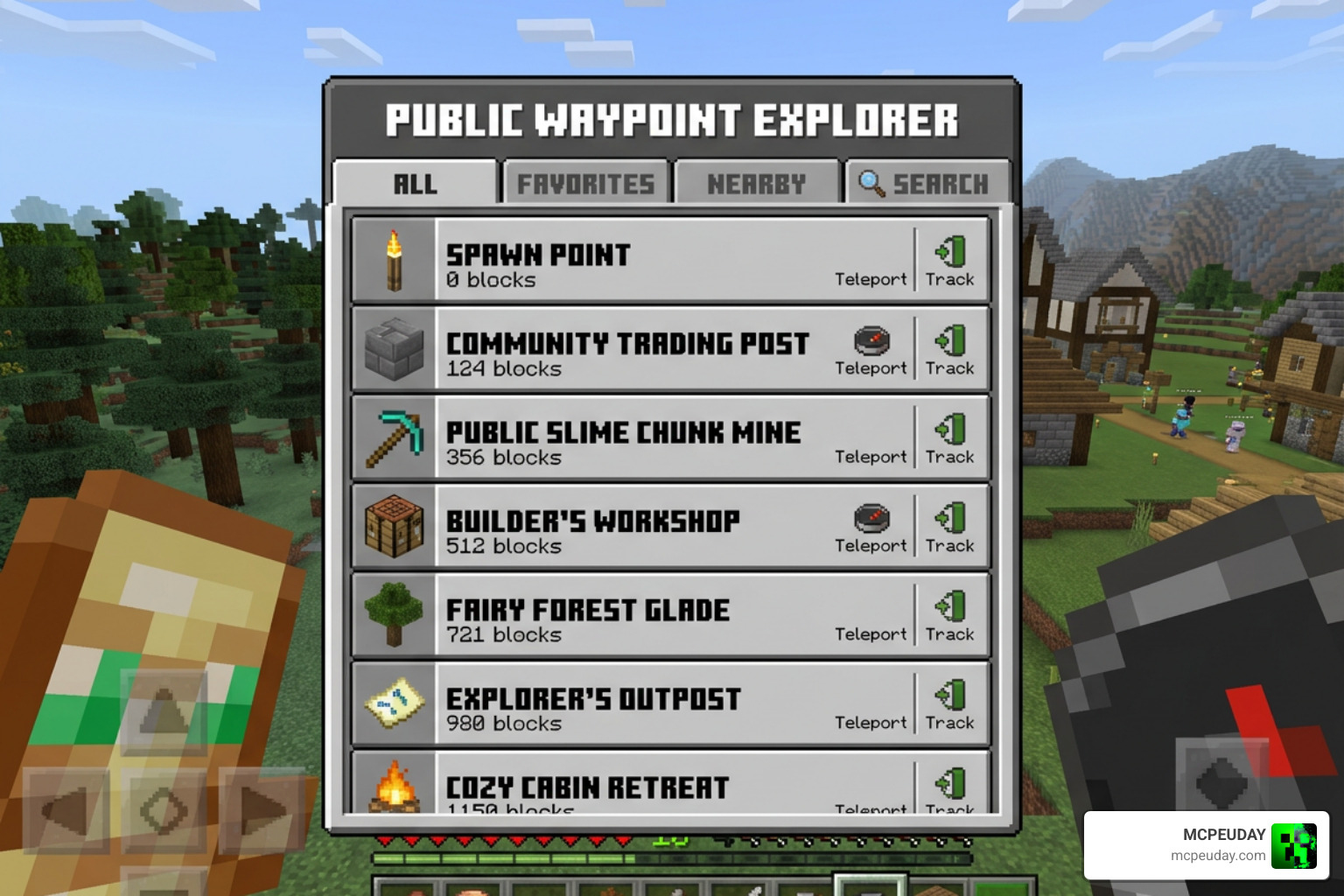
Using the “Explore public waypoints” tab, players can browse locations published by others, view visit statistics, and add community hubs to their personal “My Favorites” list. This is perfect for setting up shared nether hubs, shopping districts, or public XP farms. If you enjoy playing with others and want to expand your social circle in-game, you might also want to check out the Friend V2 Addon for Minecraft PE.
To keep things orderly, the addon includes a built-in visitor blacklist. If a player is griefing or visiting your published base without permission, you can open your waypoint settings, click “Manage visitors”, select the offending player, and add them to your blacklist with a specific reason.
Admin Controls and the Waypoint Control Panel
For server owners and administrators, keeping a multiplayer world organized is a top priority. By typing the command /function sirobwaypoints_admin in the chat, operators gain access to the Waypoint Control Panel.
From this control panel, admins can:
- Manage Player Waypoints: View, edit, rename, update coordinates, or delete waypoints created by any player on the server.
- Review Reports: If a player publishes an inappropriate waypoint, other players can use the in-game “Report” button. Admins can review these reports and take action.
- Set Featured Waypoints: Highlight official server locations, such as spawn towns or event arenas, so they always appear at the top of the public list.
- Enforce Punishments: Restrict specific players from creating or publishing waypoints if they abuse the system.
If you run a server and want to populate your world with smart companions alongside your human players, take a look at our guide on the AI Multiplayer Addon 26 X for MCPE Smart AI Teammates in Minecraft.
Customization, Economy Fees, and Installation
The Multiplayer Waypoint System ADDON is highly customizable, allowing both players and admins to tailor the experience to their specific preferences.
| Feature Category | Player Preferences | Admin Configurations |
|---|---|---|
| Visuals & Audio | Toggle countdown tick sounds, adjust UI fonts | Customize teleport particle density and camera effects |
| Localization | Choose individual language preferences | Modify the LANGUAGES.js script file for custom translations |
| Limits & Fees | View personal waypoint counts | Set maximum waypoint limits (0 to 999) and teleportation costs |
Economy Integration and Teleportation Fees in the Multiplayer Waypoint System ADDON
To keep survival mode challenging, server admins can enable teleportation fees. Instead of free instant travel, you can configure the addon to charge players using either XP levels or scoreboard-based currency.
These fees can be customized per dimension and can even scale based on distance. For example, teleporting 100 blocks might cost 1 XP level, while traveling 10,000 blocks across the Overworld might cost 15 XP levels. Admins can also define a “dimension center” coordinate to calculate costs relative to the server’s main hub.
Installation Guide and Compatibility
To install the addon and ensure it runs perfectly on your Bedrock world, follow these steps:
- Download both the Behavior Pack and Resource Pack from the official Multiplayer Waypoint System! – Minecraft Bedrock Addons page.
- Import both packs into your Minecraft client.
- Apply the Behavior Pack and Resource Pack to your world settings.
- Crucial Step: Go to your world settings and enable the Beta APIs and Holiday Creator Features experimental toggles.
- Launch your world. If you ever lose your Waypoint Menu item, simply type ./waypoint-menu in the chat to receive a new one.
This addon is incredibly lightweight and compatible with other popular gameplay mods. For instance, it works flawlessly alongside visual and physical enhancements like the Dynamic First Person Model Addon 26 X 1 21 Realistic MCPE Gameplay Guide and utility mods like the All Entities Solid Addon for Minecraft Bedrock.
(Note: If you are looking for a Java-based alternative for Spigot or Paper servers rather than Bedrock, you can check out the niklask52t/WaypointPlus repository on GitHub).
Frequently Asked Questions about Multiplayer Waypoints
How many waypoints can a player create in each dimension?
Each player can create up to 999 waypoints in the Overworld, 999 in the Nether, and 999 in the End. This allows for a massive total of 2,997 personal teleport locations per player.
What happens if a player moves during the teleport countdown?
The teleportation process will immediately cancel. This motion-lock safety feature prevents players from exploiting teleportation to escape PvP fights or dangerous situations like falling into lava.
How do server admins access the Waypoint Control Panel?
Admins with operator status can type the command /function sirobwaypoints_admin in the chat. This grants them the admin control item to manage all player waypoints, configure server-wide settings, and handle player reports.
Conclusion
At MCPEUDAY, we highly recommend the Multiplayer Waypoint System ADDON for any group of players looking to improve their coordination and eliminate the headache of getting lost. It is a robust, lag-free, and highly customizable utility that elevates the multiplayer survival experience.
Once you have set up your teleporters, why not upgrade your server’s arsenal? Check out our list of the 5 best Minecraft Bedrock gun mods for survival and PvP in 2026 to add some serious firepower to your newly connected bases!